
SharePoint Advanced Management: what's new for 2026
 By Vlad Catrinescu Microsoft MVP and MCT · Pluralsight Author
SharePoint Advanced Management (SAM) is evolving from a set of governance reports into a full content governance suite for Microsoft 365, complete with its own AI assistant called the SharePoint Admin Agent. I sat down with Dave Minasyan, the Principal Product Manager who leads SAM at Microsoft, to break down what is new and what is coming in 2026. Here is what every Microsoft 365 administrator needs to know.
Key takeaways
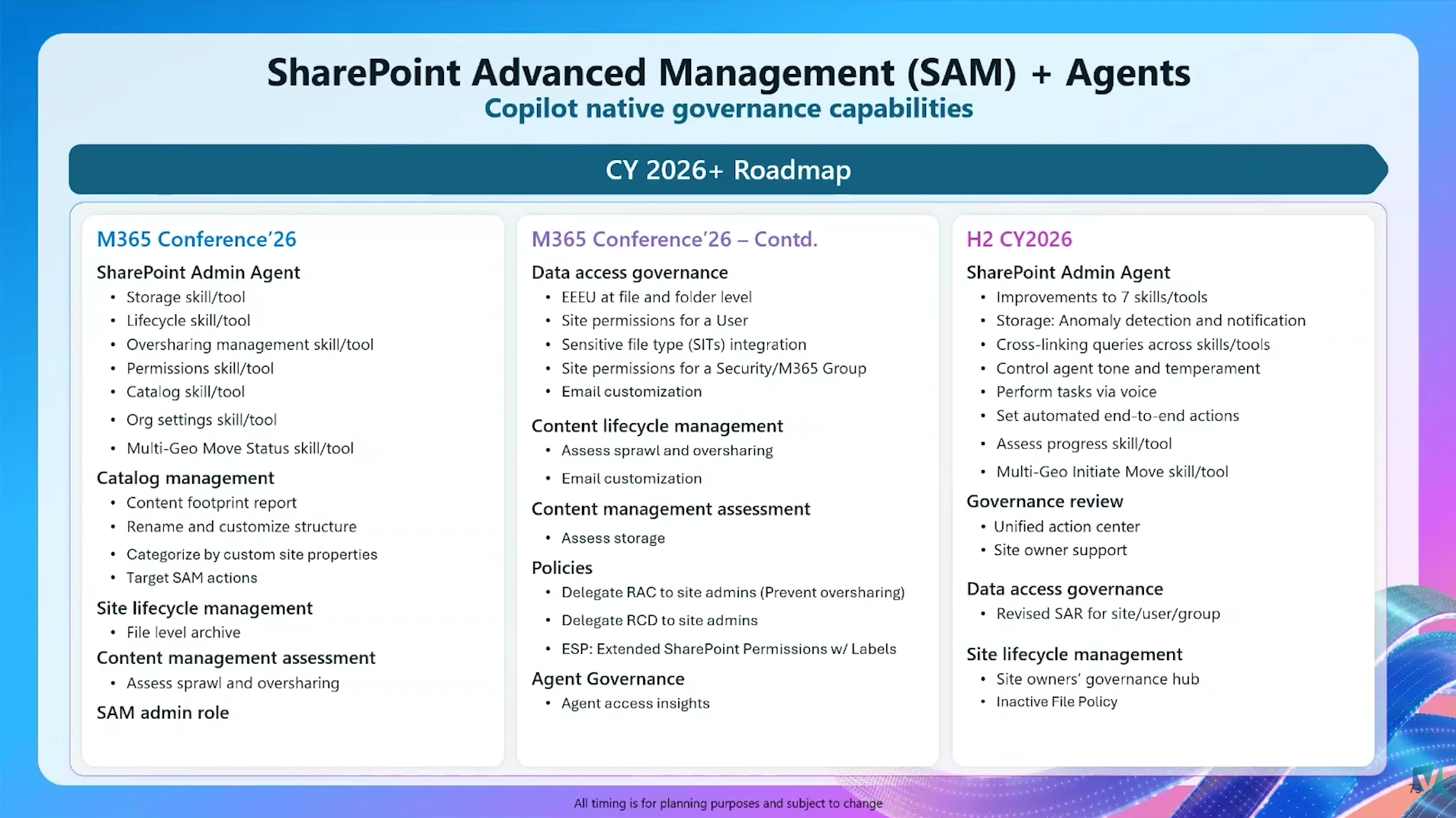
- The SharePoint Admin Agent launches with 15 to 20 supported actions, with a target of around 150, so admins can analyze governance data and remediate issues from a chat interface.
- A new catalog management area lets you organize sites into categories and groups, then scope reports, policies, and Copilot rollouts to the structure you defined.
- Site owners will receive batched policy emails (one for lifecycle tasks, one for oversharing reviews) plus a single governance hub page listing everything the admin asked them to do.
- A new SharePoint Advanced Management Administrator role is required for the upcoming file-level oversharing reports. Even global admins must assign it to themselves.
- SAM is now supported in sovereign clouds, and most of the new features are rolling out between June and August, with more expected at Microsoft Ignite.
SharePoint Advanced Management is now a full governance suite
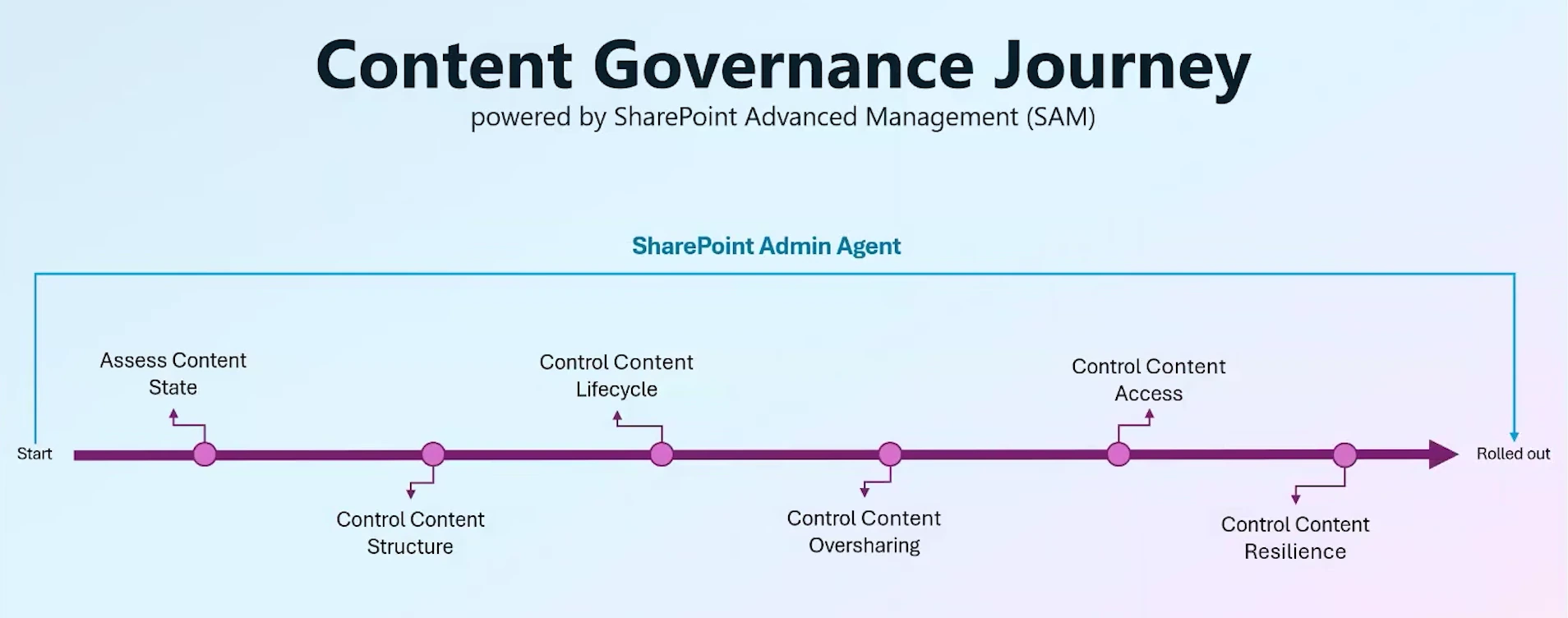
For the past few years, SAM was built around three pillars: sprawl control, oversharing control, and lifecycle management. Those pillars are not going away. However, Microsoft is expanding the suite with two new investment areas: content relevance and content resilience. In other words, SharePoint Advanced Management now covers five focus areas, and an AI agent sits on top of all of them.
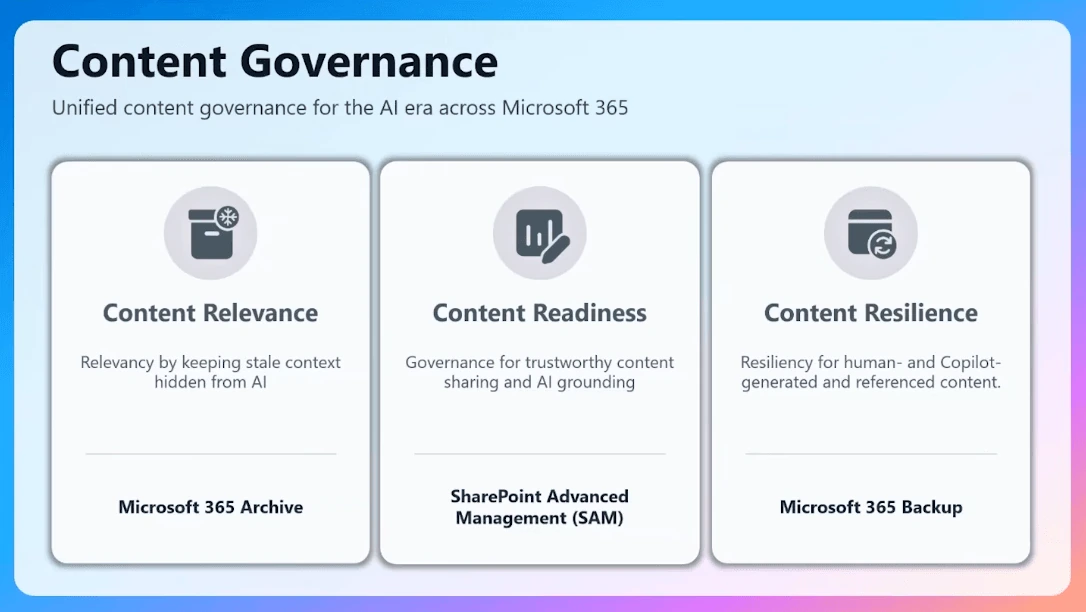
I have been presenting on SAM at conferences for the past three years, and it has grown from a topic you could cover in 45 minutes into a true product suite. The flip side is that admins now ask a new question: with this much tooling, where do I even start? A lot of what is coming in 2026 is designed to answer exactly that.
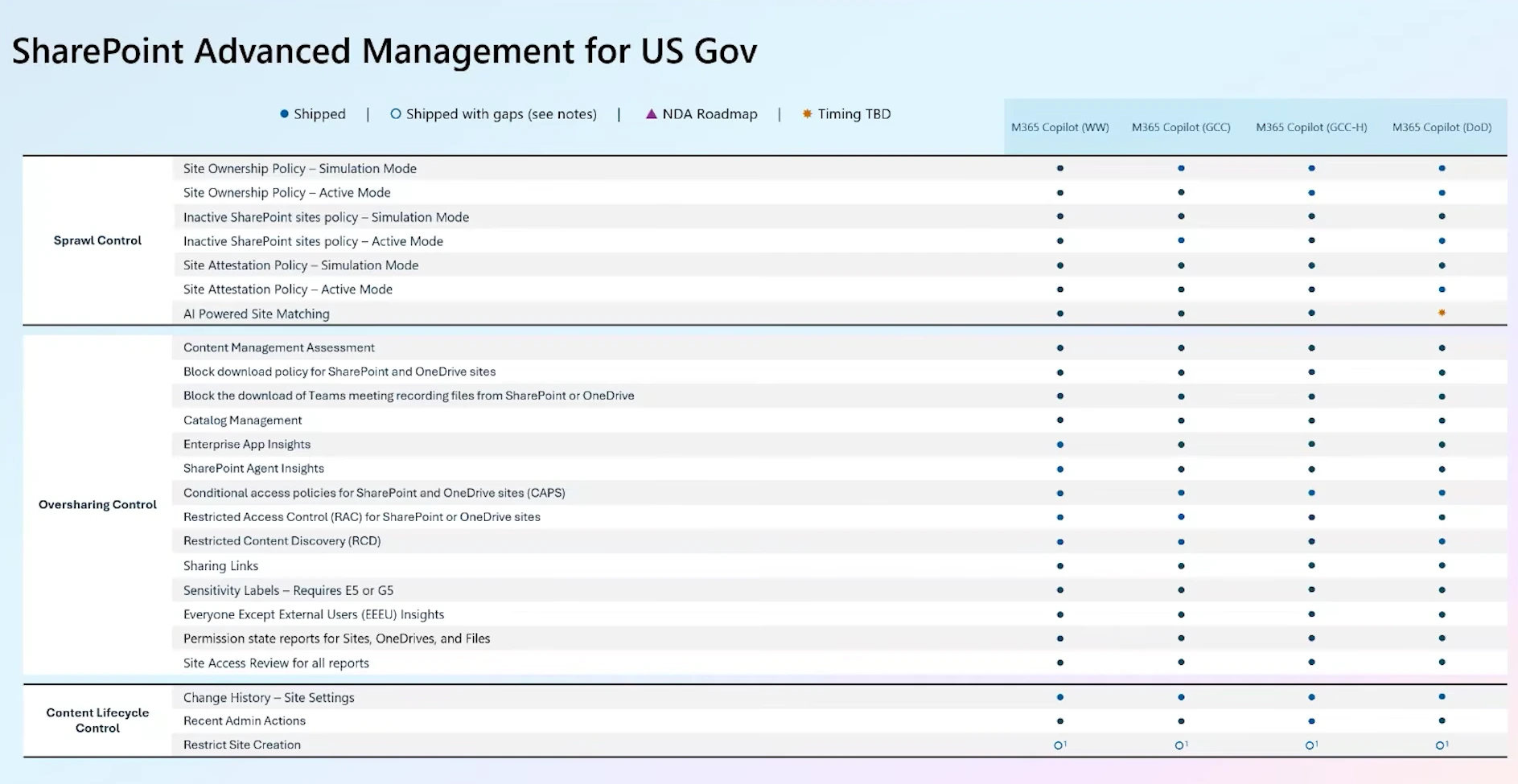
There is also great news for government customers. As of February, SAM is fully supported in sovereign clouds. The only remaining gap is AI-powered semantic site matching, and the team is targeting full coverage within the next few months.
Meet the SharePoint Admin Agent
The headline feature is the SharePoint Admin Agent, an AI assistant that reasons over your SharePoint and SAM data. Microsoft built it as a declarative agent, which means you can summon it from anywhere Copilot is available instead of navigating to the SharePoint admin center first.
The agent fully honors your admin role. It is anchored on the data you can access as a SharePoint administrator, so a Teams administrator without SharePoint permissions will not even see the agent. Microsoft is also working with the Teams and Exchange teams to eventually bring content governance insights into those admin roles, in their own context.
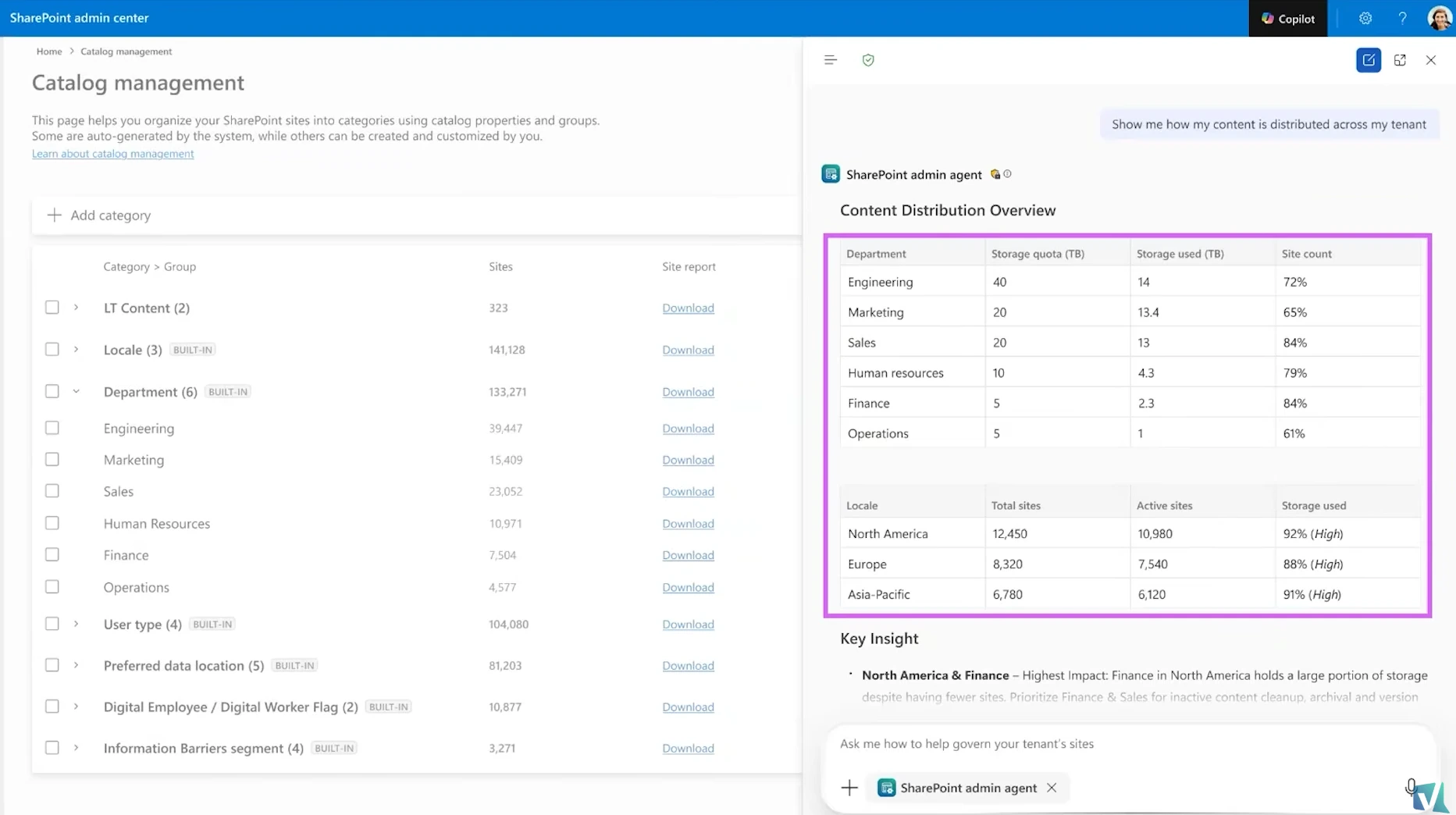
At launch, the agent supports roughly 15 to 20 actions, and Microsoft is targeting around 150 over time. The promise is that you no longer need to know which report to run or which policy to configure. You describe the problem, and the agent runs the analysis, surfaces key insights and anomalies, recommends actions, and can even execute sequential tasks. For example, it can run a site access review on a set of sites and then enable Restricted Content Discovery on those same sites, all from one prompt. You can also ask open questions, like what a specific group has access to or where your cleanup opportunities are, and the agent will work out your storage growth rate and how long until you run out, in seconds. Today, that work means downloading reports and building Power BI dashboards.
Here is a stat from my conversation with Dave that surprised me: only about 5 percent of admins have access to PowerShell in their organizations. For everyone else, the agent is a big deal because Microsoft plans to bring safe PowerShell-powered capabilities into it. Admins who never touch scripts will be able to automate remediation just by asking.
Everything the agent does is on rails. Destructive actions are intentionally not supported, a guardrail Microsoft’s Sesha Mani demonstrated live on stage at Ignite, when he asked the agent to delete a list of sites, and it refused. Archiving is supported instead, because archiving is easy to reverse, and restoring is instant within the first seven days. If you really want to delete something, you still do that manually through the admin center or PowerShell. When I asked Dave which part of the 2026 wave he is most excited about, the agent topped his list, followed by governing agents as a brand-new type of content.
Start with the content management assessment
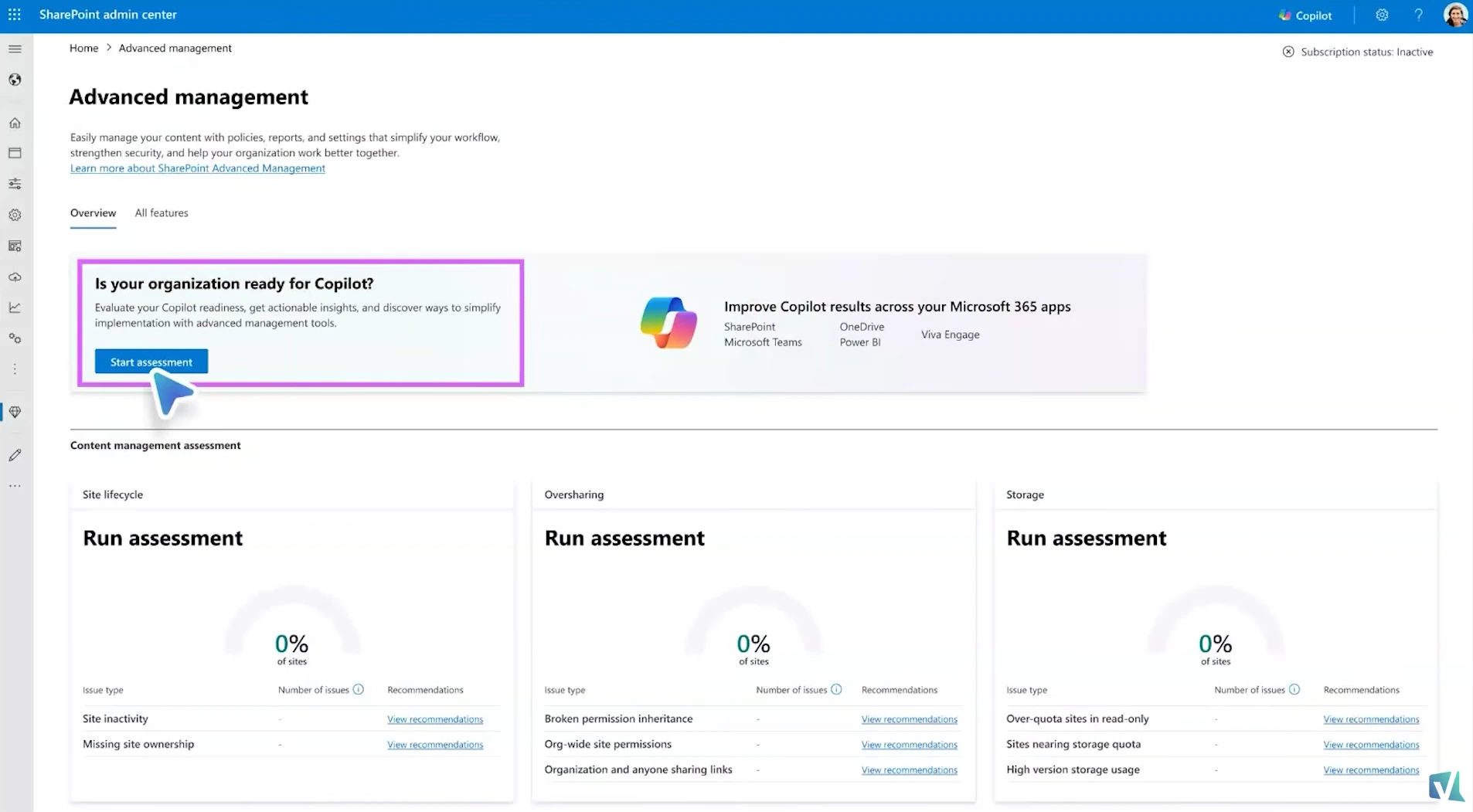
If you are wondering where to begin, the answer is the content management assessment. Go to the Advanced Management tab in the SharePoint admin center, click Start assessment, and SAM automatically runs the recommended reports and surfaces the patterns that need attention.
The assessment can take anywhere from 24 hours to 5 days to run, depending on the size of your tenant. Today it shows two cards, site lifecycle and oversharing, and a third card for storage analysis is on the way, since most support requests Microsoft receives are storage-related. Microsoft recommends rerunning the assessment monthly, so your data stays fresh, and more frequent runs are planned.
Running the assessment serves two purposes. First, it shows you where your problem areas are, and do not be surprised if something like 40 percent of your sites require attention on the first run. Many customers who believed their in-house governance was solid discovered gaps, simply because much of this data was never available through APIs or PowerShell before. Second, the assessment generates the data the SharePoint Admin Agent needs, because without reports, the agent has nothing to reason over.
One more point worth emphasizing: this is not just about Copilot. Even if you are not deploying AI next month, cleaning up your content estate improves search, security, and storage across the board. AI is an amplifier. It will amplify whatever state your tenant is in, good or bad.
Catalog management: structure your sites into categories and groups
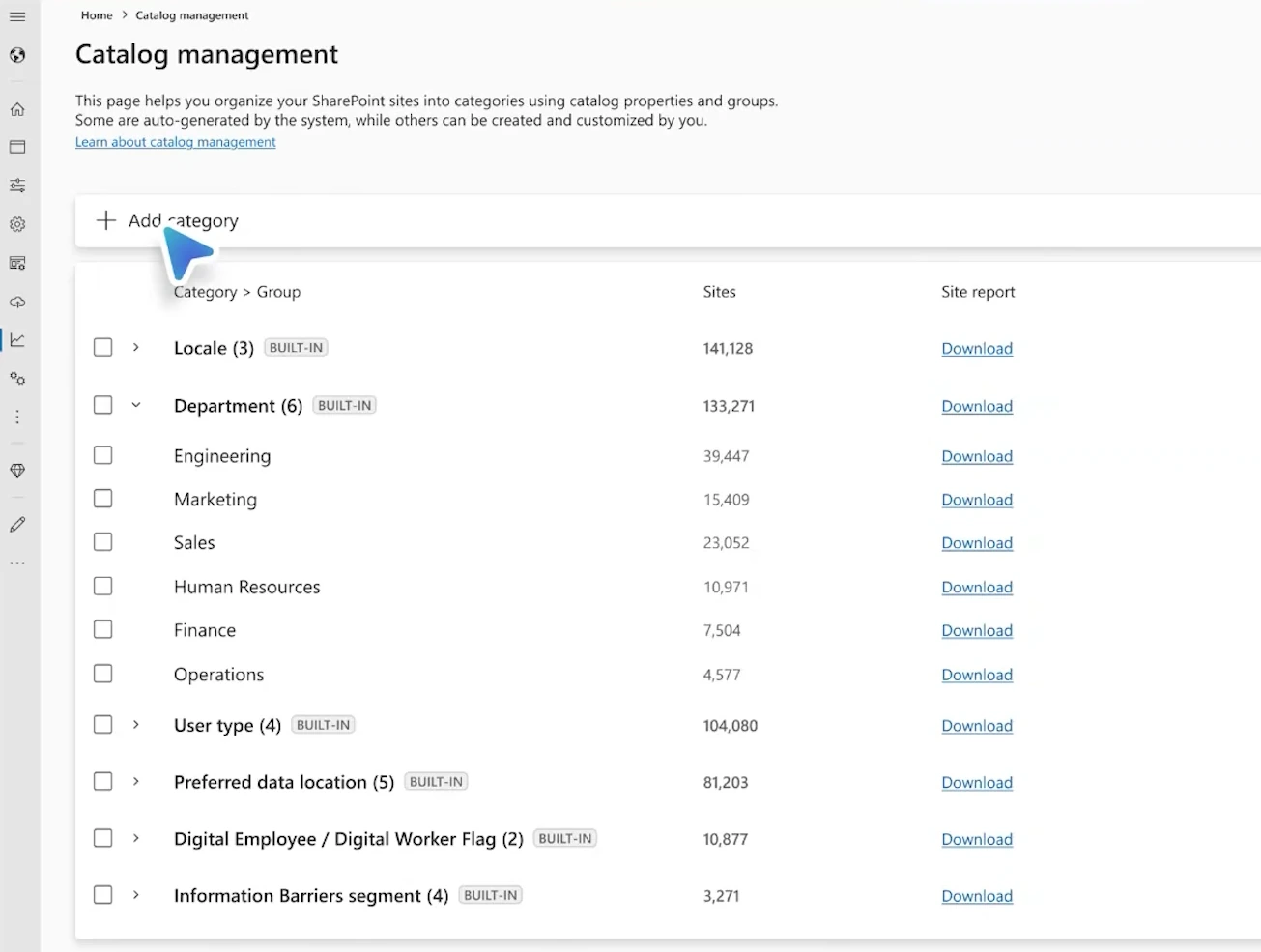
This is the feature I would start planning for today. Most tenants are a blob of unstructured sites, and Microsoft does not train its agents or LLMs on customer data, so the agent has no idea which sites belong to which department unless you tell it. Catalog management solves that by letting you bucket sites into categories and groups that match how your organization works.
Out of the box, SAM builds two groupings automatically. The department category looks at each site’s owners, reads their department attributes in Microsoft Entra ID, and buckets the sites accordingly, with some intelligence around sites that have multiple owners. The locale category groups sites by language, so it always covers your full site inventory. Sites whose owners have no department attribute land in an Other group, and that group is a signal worth acting on: if thousands of sites are uncategorized, your Entra ID metadata needs attention so SharePoint, Copilot, and the agent can understand your content structure.
Custom categorization is rolling out around mid to late June, with three options:
- CSV upload: create your own curated categories, with up to 20 groups per category and no limit on the number of sites. Perfect for cases like managing leadership team sites differently from everything else.
- Property bag search: SAM scans your sites for a site property you specify, such as a cost center applied by your provisioning process, and automatically creates one group per property value. This option is currently limited to 20,000 sites, a cost boundary rather than a technical one.
- Extension attributes: curate groupings based on Entra ID extension attributes beyond the automatic department mapping.
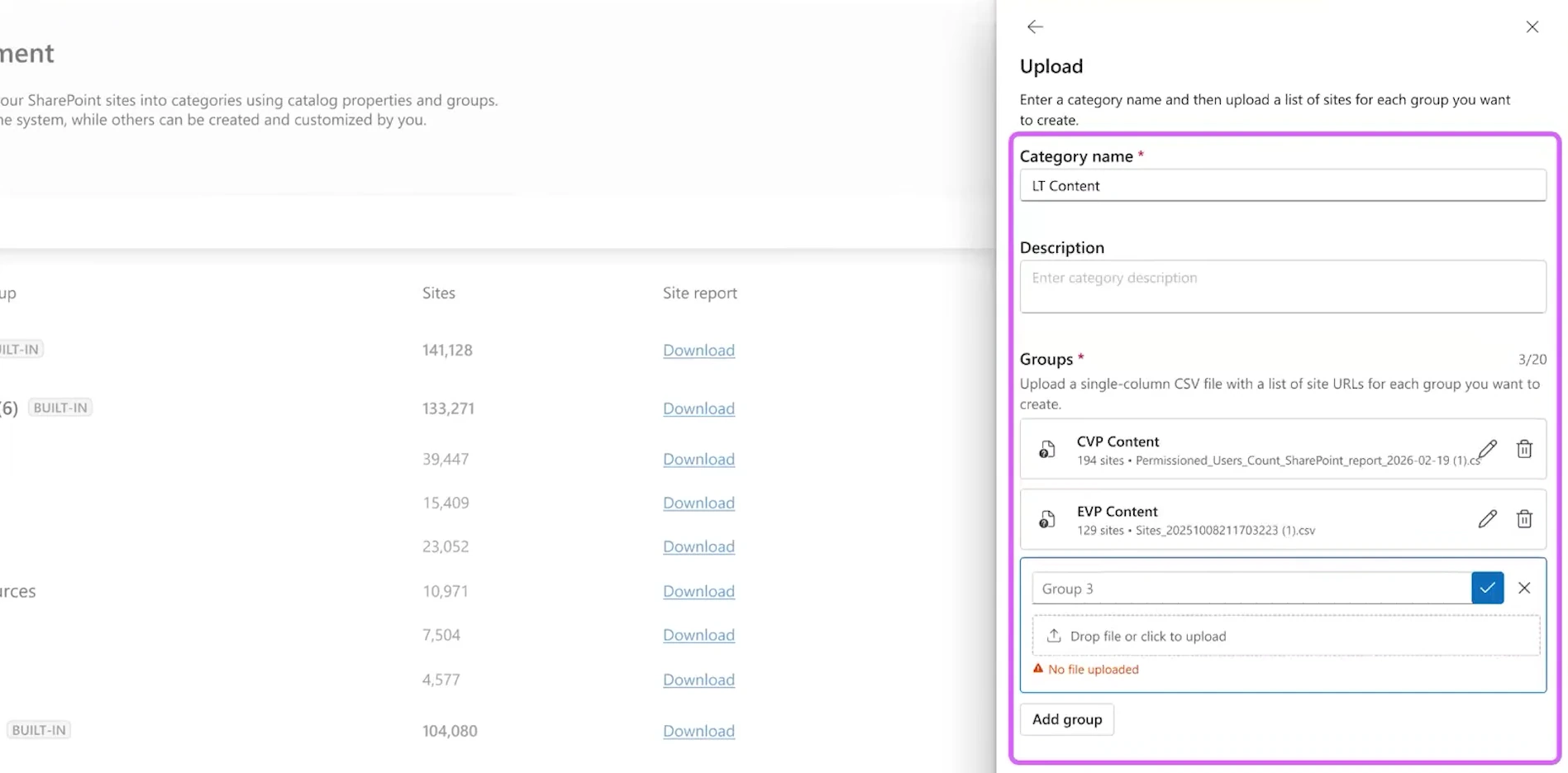
A few useful details from my conversation with Dave: any site that appears in your active sites list is supported, including group-connected team sites, channel sites, and communication sites. SharePoint Embedded containers are not covered yet, but onboarding them is in progress. A site can belong to multiple categories and groups at the same time. And most mid-size to large customers complete the setup within a day or two.
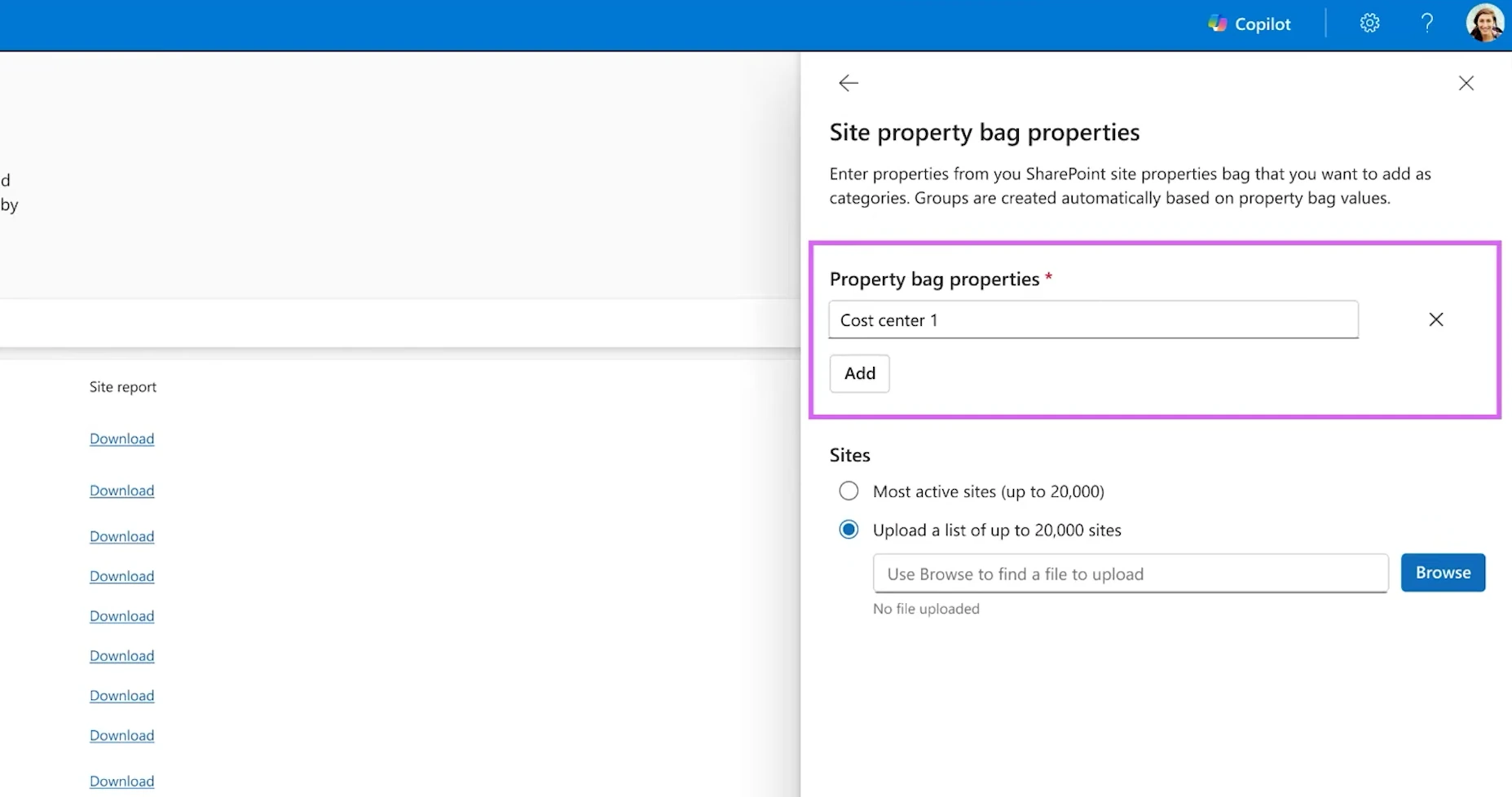
The payoff is significant. Once your catalog exists, the agent’s insights become far more targeted, combining data sets like North America plus finance to spot patterns and anomalies. You can also scope reports and policies to a category instead of the whole tenant. Run a permission state report on just the engineering department, remediate, roll out Copilot to those users, then move on to the next department. That turns a scary tenant-wide cleanup into a series of manageable sprints, and it gets AI adoption moving sooner.
Site lifecycle management: batched emails and a governance hub
SAM’s three lifecycle policy types are unchanged. The inactive sites policy finds stale content and can act on it, the site ownership policy makes sure every site has someone accountable, and the attestation policy asks owners to periodically confirm their site details. Attestation is the proactive one: run it regularly and you will have far fewer inactive and ownerless sites to clean up reactively.
What is new is the experience around the policies. Catalog integration means you will be able to scope a policy to a category or group you defined, so you can target a single department instead of the entire tenant. Keep in mind the limit of 5 inactive site policies still applies for now, so with many categories you will need to get creative. Microsoft has heard the feedback, but there is no ETA on raising the limit yet.
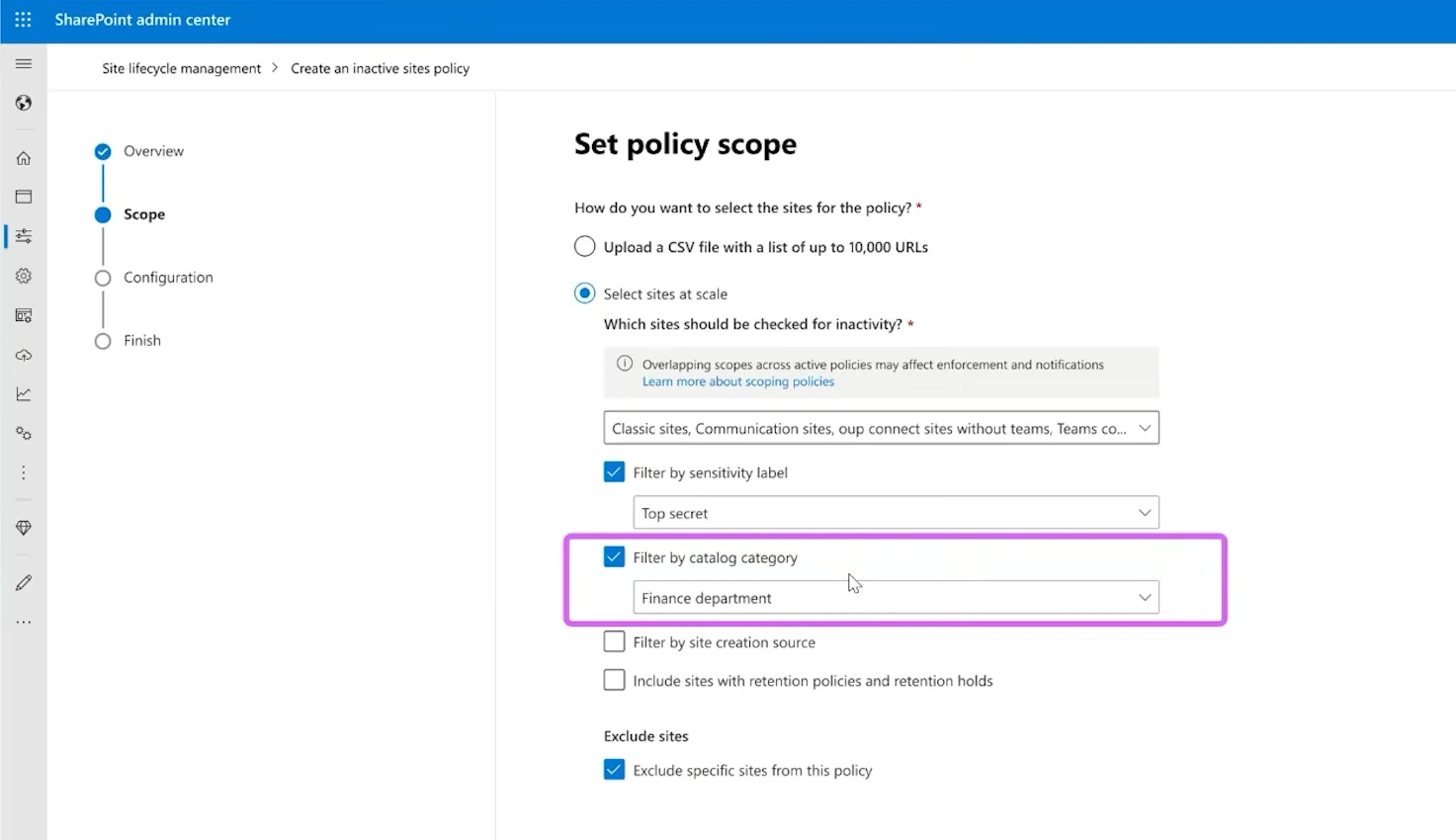
A new exclude users and groups list keeps specific people, like your leadership team, from ever receiving policy notifications. Nobody wants to send 1,000 automated emails to the CEO, who is a member of half the sites in the tenant.
The change I am personally most excited about is the end-user experience. Instead of one email per site, owners will now get batched summary emails: one bundling all lifecycle requests (inactive sites, ownerless sites, and attestations) and one bundling all oversharing requests, such as site access reviews.
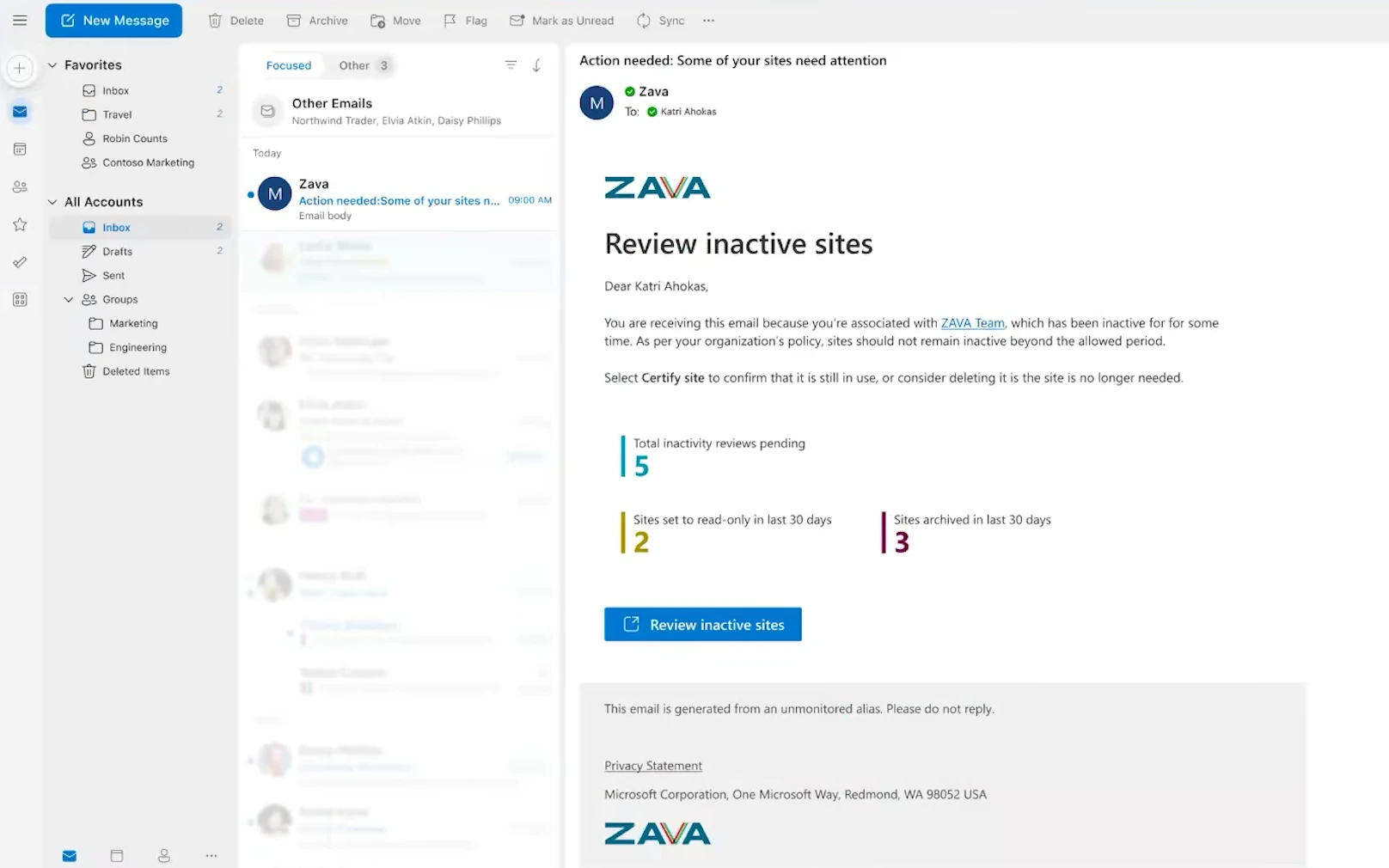
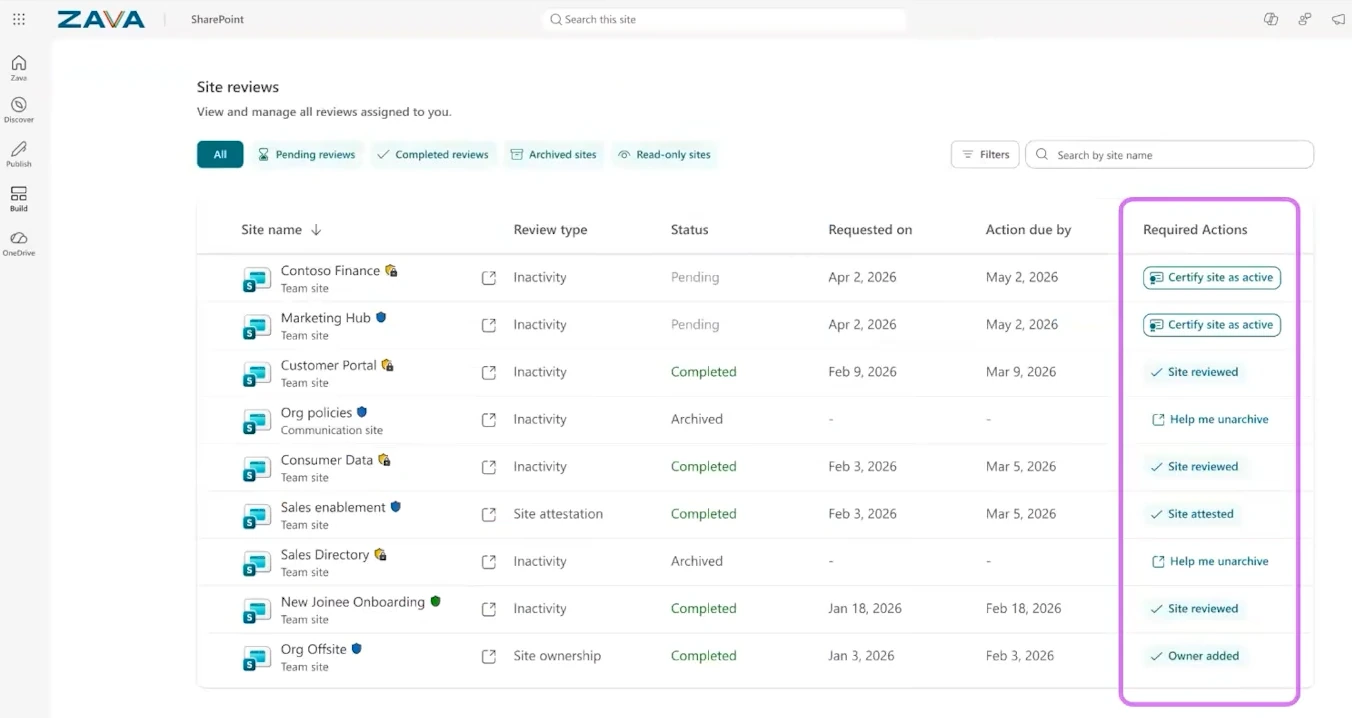
From there, a button takes the owner to a new governance hub, a single page listing everything the admin has asked them to do. Dave noted the governance hub name might change before release. Looking further ahead, Microsoft wants to extend the SharePoint Admin Agent to site owners too, so it can help them complete those requested actions, not just help admins initiate them. Considering many organizations have one SharePoint admin per thousand users, anything that makes site owners more self-sufficient is a win.
As with everything in SAM, you can run policies in simulation mode first. Simulation keeps your configured actions but does not execute them, which makes it the safest way to build trust before activating a policy tenant-wide. For the lifecycle capabilities that shipped over the past year, check out my breakdown of what’s new in SharePoint Advanced Management 2025.
Oversharing: file-level reports and a new admin role
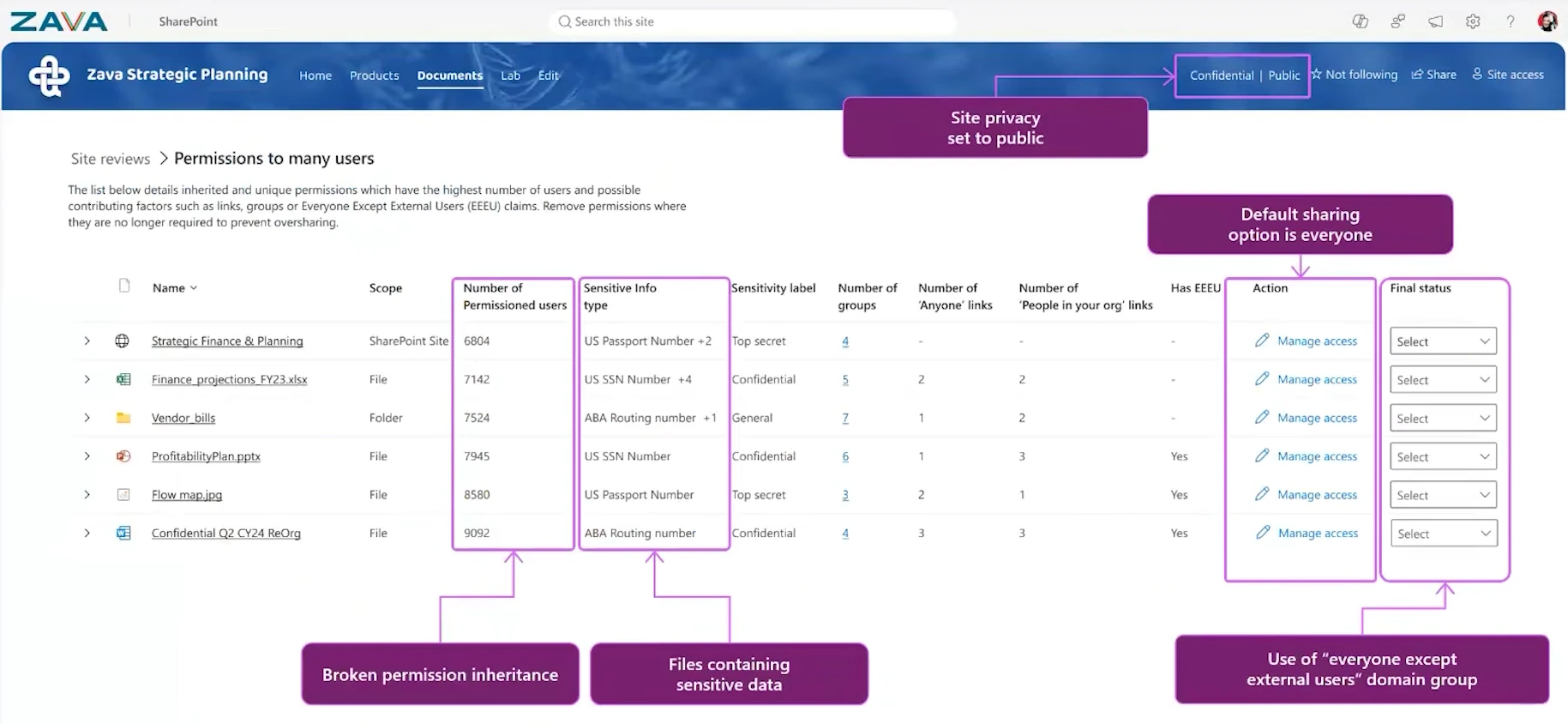
Microsoft’s framework here has not changed: there are five basic types of oversharing, and they cover roughly 80 to 90 percent of the oversharing patterns Microsoft sees across tenants. The permission state report remains the flagship tool, and Microsoft is working with the Purview team to bring sensitive file type information directly into it. If you have sensitivity configured in Microsoft Purview, that context will flow into the report and help you prioritize the riskiest sites.
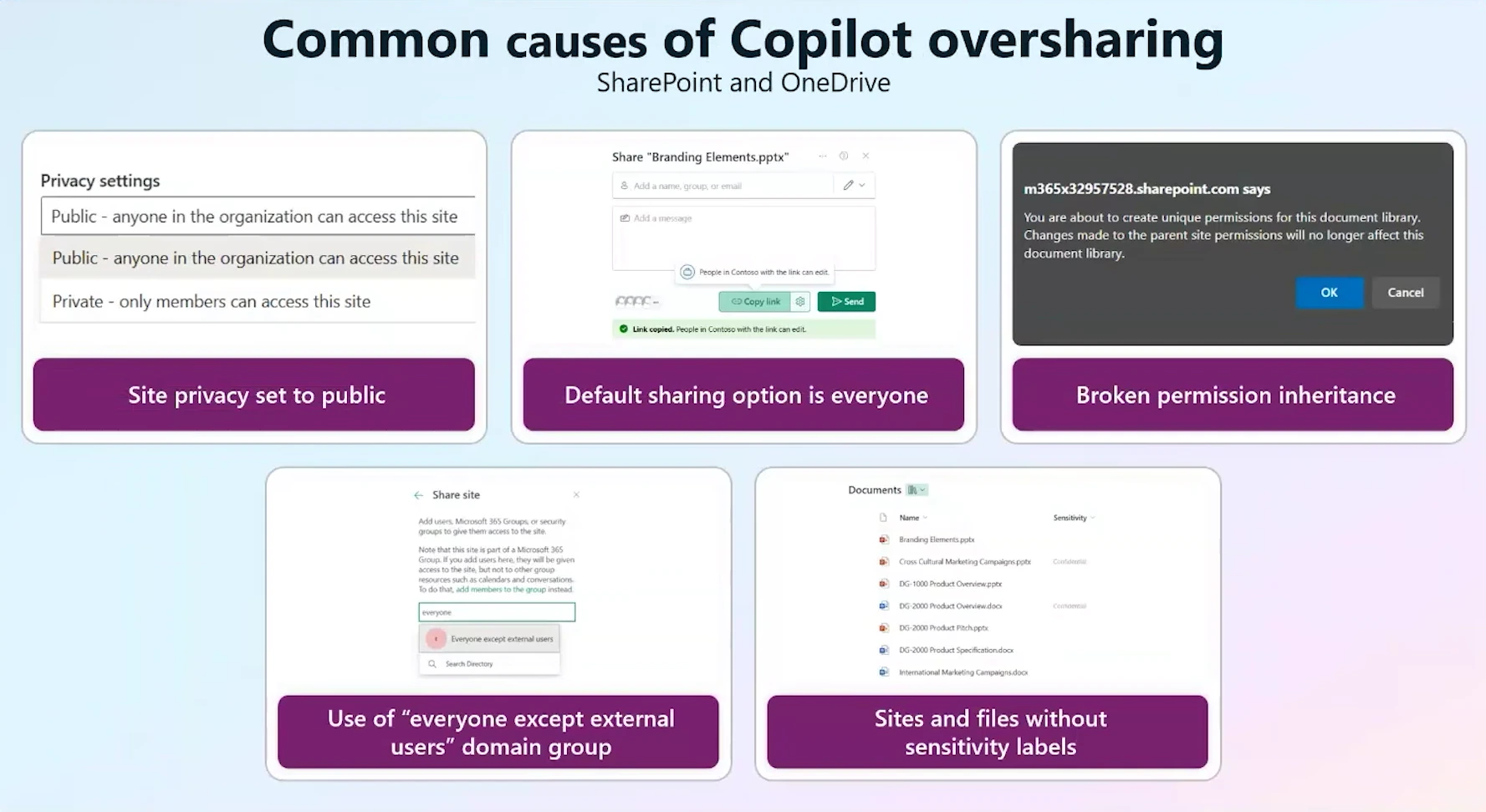
The bigger announcement is file-level reporting. One of the most requested reports, files shared with Everyone Except External Users (EEEU), is coming. Because these reports can contain an enormous number of rows, there is no dashboard view. Instead, you get a downloadable export you can analyze in Excel, Power BI, or with Copilot. The agent cannot reason over file-level data yet, but that is on the roadmap.
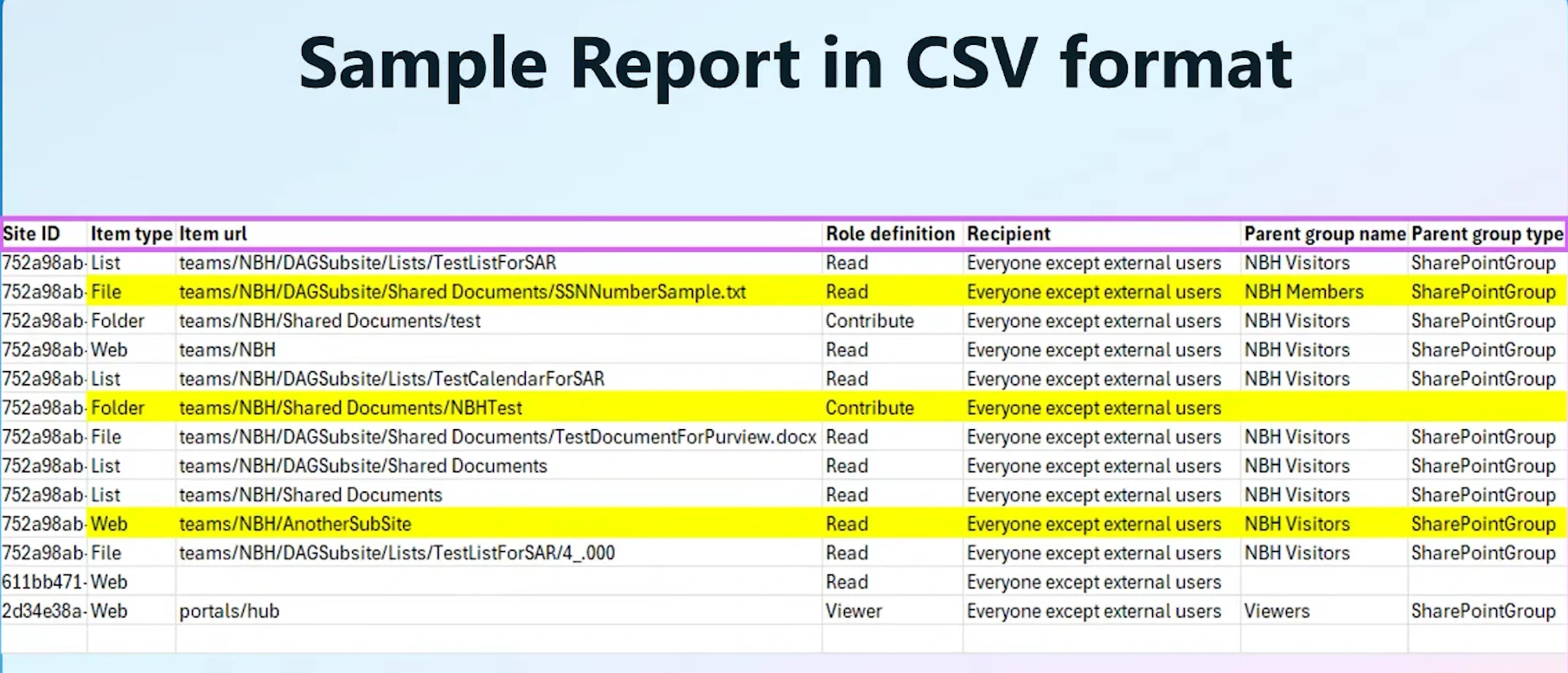
File-level data also comes with a new security model. Microsoft introduced the SharePoint Advanced Management Administrator role, a superset of the SharePoint Administrator role that unlocks file-level reporting and, over time, more privileged capabilities. Regular SharePoint admins cannot run file-level reports, and neither can global admins by default. Just like Purview, you must explicitly assign yourself the role. If you are the only SharePoint admin at your company, plan to take this role, since it includes everything the SharePoint Administrator role does. In larger teams, decide deliberately who gets file-level visibility.
Two related capabilities round out the oversharing story. Site access reviews let you ask site owners to review potentially overshared content, now bundled into the batched emails described above. And Restricted Content Discovery can now be delegated to site owners through PowerShell, which makes sense: owners, not admins, know whether their content should be reasoned over by Copilot and agents.
Agent insights: govern what agents can access
Agents are quickly becoming a content type of their own in Microsoft 365. According to Dave, Microsoft alone has around 2 million agents internally, and every one of them consumes and generates content. His take: an agent is essentially another type of file that needs to be governed like any other content.
One important distinction first. SAM does not manage the agents themselves. Turning agents on or off happens in the Microsoft 365 admin center, which has a dedicated agents area. SAM’s new agent insights area is about content governance: showing you which agents interact with your content and what they can access.
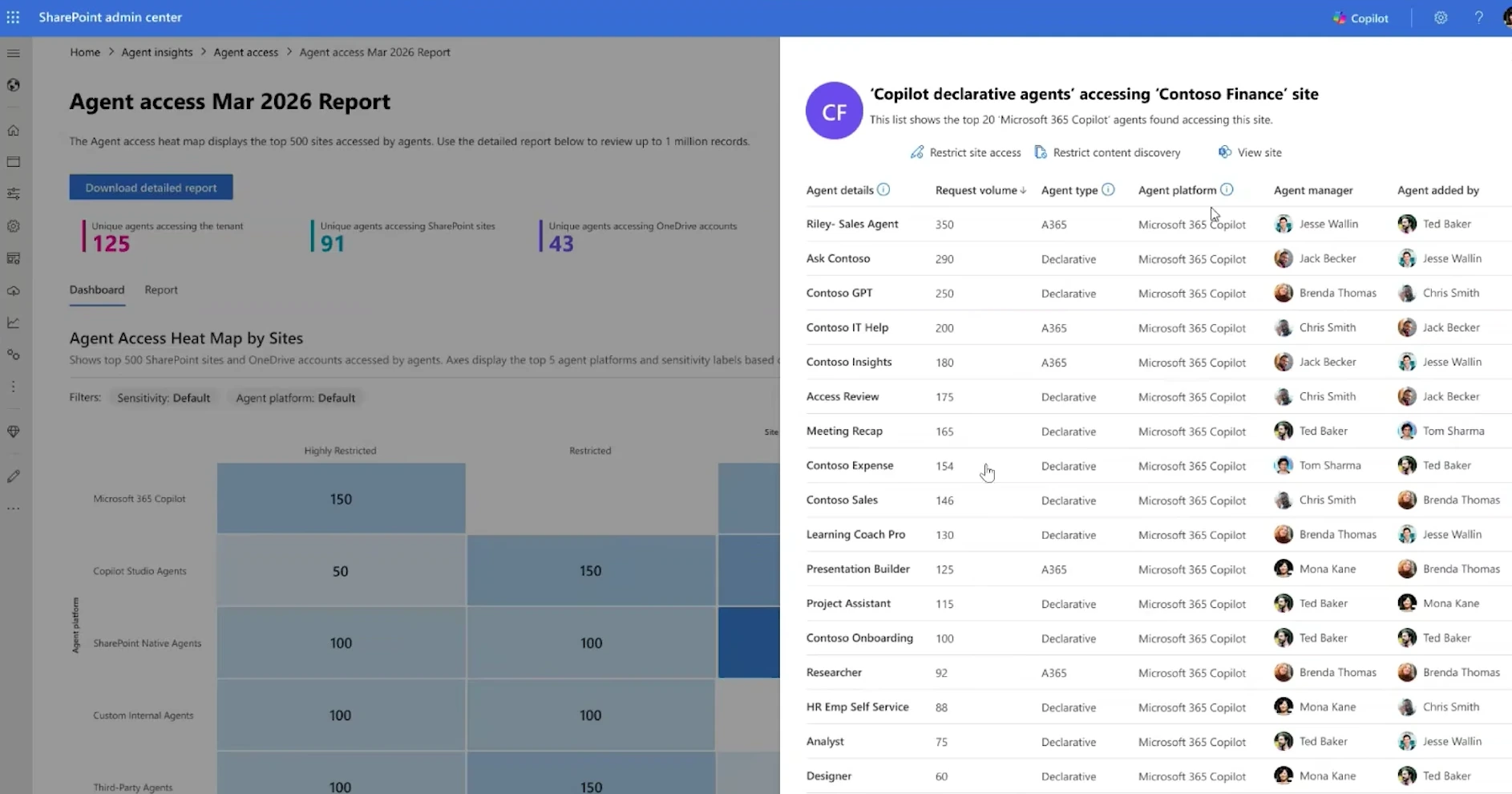
At the site level, you can see every active agent, its request volume, and its type: a SharePoint agent, a declarative agent built through Copilot Studio or Agent Builder, or an agent with its own Microsoft Entra agent identity, which usually signals something custom deployed by a developer. Microsoft is also working on surfacing each agent’s owner and creator, so you know exactly who to contact. With Microsoft Agent 365 integration coming, SharePoint admins keep this visibility even without access to the Agent 365 interface. There is also a heat map view that shows where agent activity concentrates across your tenant, making problem areas easy to spot at a glance.
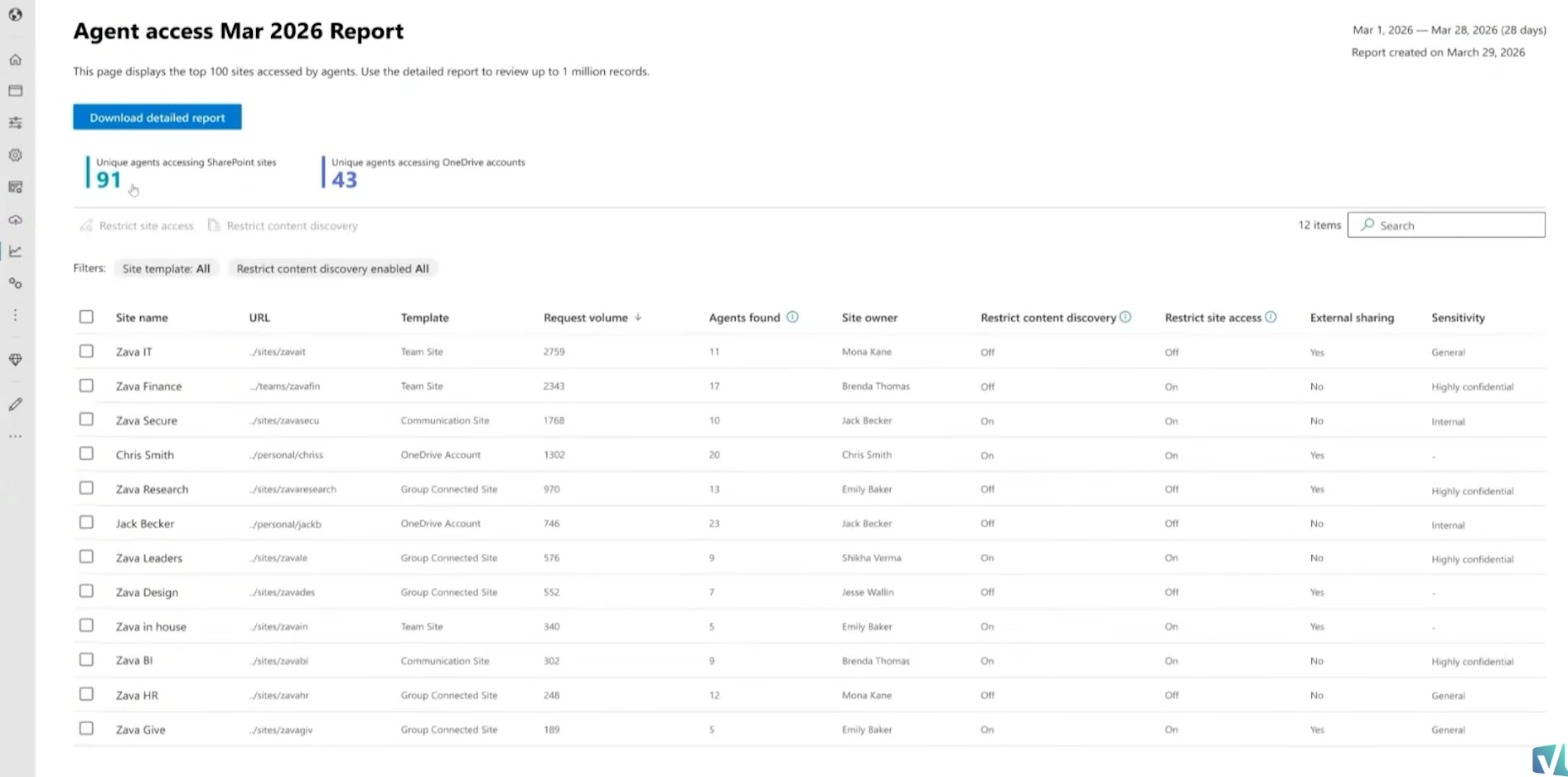
If you find an agent you do not recognize, you can act immediately. Restricted Content Discovery blocks both Copilot search and agents, so you can lock down the site while you investigate. Note that the restriction applies at the site level, not the agent level, at least for now. Agent insights data is not yet wired into the SharePoint Admin Agent, but that integration is planned.
Content resilience: settings, backup, and Multi-Geo
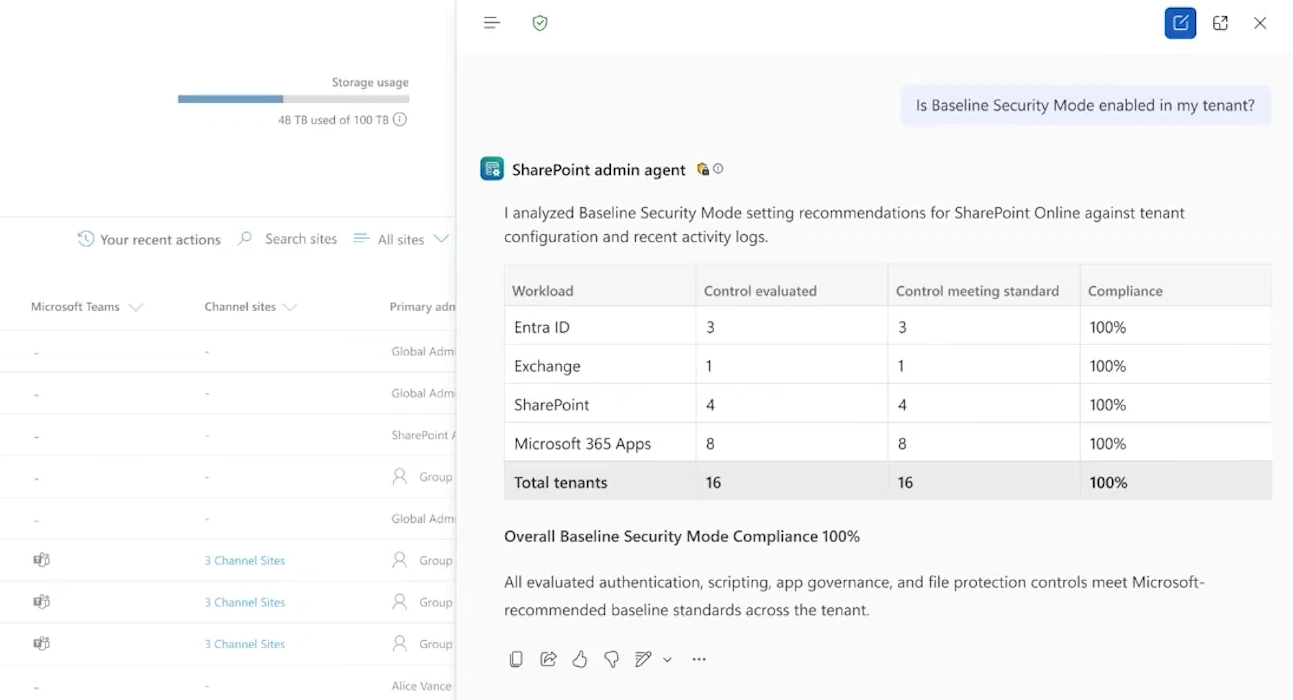
Resilience is the newest investment pillar, and most of it surfaces as new skills for the agent. The organizational settings skill reasons over your tenant configuration. Ask whether you meet Baseline Security Mode standards and you get a report card. Ask what would happen if you made your sharing posture more restrictive, and you get an impact analysis before you change anything. About 45 tenant settings are supported today out of roughly 250 Microsoft has identified, and the list keeps growing. Visibility is role-scoped, so a SharePoint admin sees the SharePoint settings state, not potential vulnerabilities in Entra.
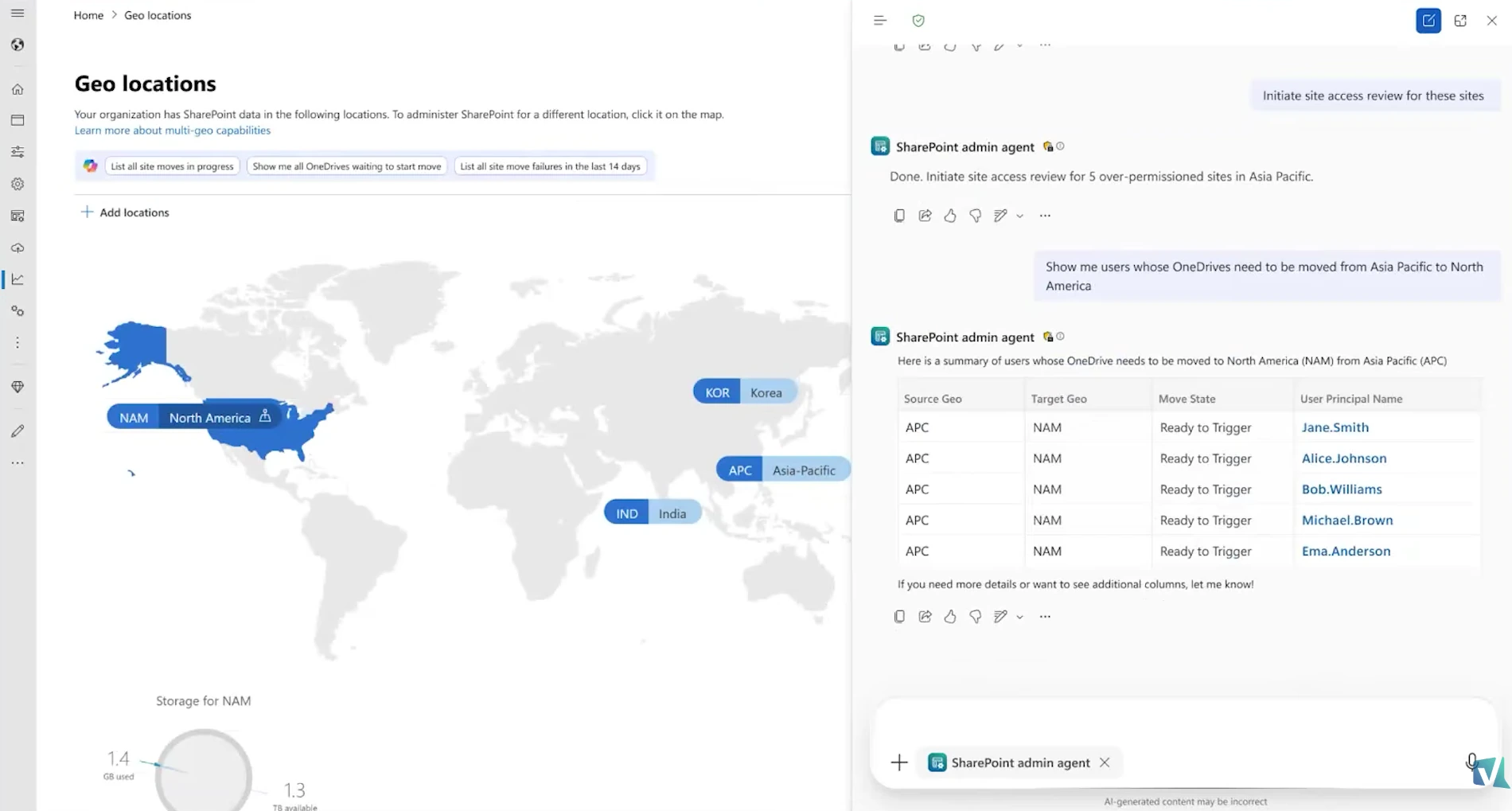
A backup skill and a storage skill are also in the works, so the agent will understand your Microsoft 365 Backup state and recommend recovery options when you need to restore quickly. Finally, a new Multi-Geo skill starts with tracking cross-geography content moves, with proactive detection planned next: surfacing users who changed countries so you can initiate the data move before compliance becomes a problem.
What this means for you
Most of these features land between June and August, with more expected at Microsoft Ignite. You do not need to wait to get value, though.
First, run the content management assessment if you have SAM. It takes one click, the results guide everything else, and the same data powers the SharePoint Admin Agent later. Since the assessment can take up to 5 days on large tenants, start it before you need it, and put a monthly rerun in your calendar.
Second, plan your catalog structure now so you are ready when custom categorization ships. Audit your Entra ID department attributes so sites do not pile up in the Other bucket, and sketch out categories that match how your organization actually manages content. If you have a custom provisioning process, consider stamping a property bag value on every new site so future sites classify themselves. The setup typically takes a day or two and pays off in scoped policies, targeted insights, and a phased Copilot rollout plan.
Third, sort out roles and guardrails. Decide who gets the new SAM Administrator role, because file-level oversharing reports will not run without it and even global admins must assign it explicitly. Build your executive exclusion list before activating lifecycle policies, and use simulation mode for the first run. If you are unsure what your licenses include, I covered the licensing model in detail in my SharePoint Advanced Management licensing Q&A with Microsoft. And if you want the bigger picture beyond SAM, start with my guide to content governance in SharePoint Premium.
Want to shape where SAM goes next? Dave personally reviews the feedback from the SAM preview program, and he reads the comments on this interview too. Drop your questions and feature requests in the YouTube comments, and connect with Dave Minasyan on LinkedIn (opens in a new tab). For more Microsoft 365 governance and certification news, subscribe to the Vlad Talks Tech newsletter at vladtalkstech.com.
Frequently asked questions
Do I need an extra license for SharePoint Advanced Management?
SharePoint Advanced Management is included with the Microsoft 365 Copilot license, so if your organization owns Copilot, you already have SAM. Organizations without Copilot can purchase SAM as a standalone add-on license for Microsoft 365.
Can the SharePoint Admin Agent delete sites or files?
No. The agent is intentionally built without destructive actions, so it will refuse to delete sites even if you ask. It can archive content instead, because archiving is reversible and restoring is instant within the first seven days. Deleting still requires the admin center UX or PowerShell.
Who can run the new file-level oversharing reports?
Only users with the new SharePoint Advanced Management Administrator role. The role is a superset of the SharePoint Administrator role and is not granted to anyone by default. Even global admins must explicitly assign it to themselves, similar to how Microsoft Purview handles privileged access.
Is SAM available in government and sovereign clouds?
Yes. As of February, SAM is fully supported across sovereign clouds, including government environments. The only feature still rolling out is AI-powered semantic site matching, and Microsoft is targeting full parity within the next few months.

