
Identity Secure Score in Microsoft Entra ID: What to Fix First
 By Vlad Catrinescu Microsoft MVP and MCT · Pluralsight Author
Microsoft gives every tenant a score for how protected your identities are, and it’s included in every Microsoft Entra ID license. Have you checked yours? It’s called Identity Secure Score, and it’s a lot more useful than a report card, because it ranks every recommendation by how much risk it removes, so you can see which moves are worth the most points.
Key takeaways
- Every Microsoft Entra ID tenant has an Identity Secure Score, Free edition included, and you’ll find it right on the home page of the Microsoft Entra admin center.
- Each recommendation is worth points based on how much it reduces your identity risk, so the ones worth the most points are the ones to tackle first.
- If you only do one thing, require multifactor authentication for administrative roles, because an attacker who gets into an admin account without it is in control of your tenant.
- Microsoft recalculates your score every 24 hours, and it can go down as well as up, for example when you add users and don’t secure them properly.
- Microsoft Copilot (formerly Microsoft 365 Copilot) answers with whatever each identity can reach, so your identity posture really is your Copilot posture.
What Identity Secure Score measures
Almost every breach we see in the news these days starts the same way, with someone’s credentials getting compromised. But before you can improve your identity security, you need a way to measure it, and luckily for us, Microsoft built a feature that sums up your identity security posture in a single number. That feature is Identity Secure Score, and whether you’re on Entra ID Free or Entra ID P2, your tenant already has one, even if nobody has opened it yet.
Its whole job is to help you decide what to fix first. It ranks every recommendation by how much it would reduce your identity risk, and the bigger the security impact, the more points you get for implementing it. So if, for example, one recommendation moves your score by eight points and another moves it by two, you know exactly which one to tackle first.
How the score updates, and where else it shows up
Your score shows up as a percentage, and Microsoft recalculates it every 24 hours, so when you make a change, you’ll see the improvement within a day. That works both ways, though. Add a new identity without securing it properly, and you can watch your score go down just as quickly.
Your identity score also syncs into Microsoft Secure Score in the Microsoft Defender portal, where it sits alongside the scores for your apps and devices, so your security team gets one view across every pillar. From an Entra point of view, though, this is the score for Entra admins. It’s the full identity picture, the part you can actually do something about, while your security admins in Defender keep an eye on the whole tenant.
Which recommendations have the biggest impact?
The top one is requiring multifactor authentication for administrative roles, at 10 points, and close behind it, at 9, is making sure all your users can complete multifactor authentication. You’ll also see recommendations for a sign-in risk policy, a user risk policy and a policy to block legacy authentication. There are plenty of others, of course, and Microsoft keeps adding and removing them as identity security evolves (and, unfortunately, as hackers evolve too). So it’s worth checking your score often and keeping it as high as you can.
Require multifactor authentication for administrative roles
Ten points is the most Microsoft gives any single recommendation, and for good reason. If an attacker compromises any admin account that isn’t protected by multifactor authentication, and especially a Global Administrator account, they’re now in control of your tenant. So if you only do one single thing after reading this, make it this one.
Protect all users with a sign-in risk policy
A sign-in risk policy uses Microsoft Entra ID Protection to automatically challenge sign-ins that look risky, for example by asking for multifactor authentication. ID Protection is also what flags a user signing in from Germany five minutes after they were active in Canada, and unless your users have a teleporter, that’s exactly the kind of sign-in you want flagged.
Protect all users with a user risk policy
If Microsoft finds a user’s credentials leaked on the dark web, a user risk policy automatically makes that user reset their password the next time they sign in.
I think this is a really cool feature, because there are so many sites, forums and credential dumps out there that only dedicated security professionals and hackers know about. You’ve probably never heard of most of them, which is for the best. Microsoft runs a large-scale credential scanning operation that pulls from those sources, from law enforcement and from its own threat intelligence teams, and it checks what it finds against your users’ current passwords in Entra ID. When there’s a match, the policy forces that password reset, so your identities stay protected around the clock. If your users are synced from on-premises, this relies on password hash sync.
Enable policy to block legacy authentication
Legacy protocols, like basic authentication for Exchange, can’t enforce multifactor authentication at all, and attackers know it, so they specifically target those protocols to get around your modern security. This one is worth 7 points, and Microsoft’s own analysis found that more than 99 percent of password spray attacks use legacy authentication protocols.
Identity Secure Score on the AB-900 exam
If you’re studying for the AB-900 Microsoft 365 Copilot and Agent Administration Fundamentals certification, this one is worth your time, because interpreting Identity Secure Score in Microsoft Entra ID is one of the skills measured in Microsoft’s AB-900 study guide (opens in a new tab). For the exam, remember that Identity Secure Score ranks recommendations by how much risk they reduce, so the bigger the security impact of an action, the more points it adds to your score.
And if you want to know what else to expect on exam day, my AB-900 exam review walks through the question types and the resources I recommend.
Checking the score in a real tenant
You don’t have to go hunting for it. Sign in to the Microsoft Entra admin center, and your Identity Secure Score is right there on the home page, in the Tenant status card at the top right. In my lab tenant, it’s been pretty static at around 46 to 47% for the past two or three months, so clearly I’ve got some homework to do as well.
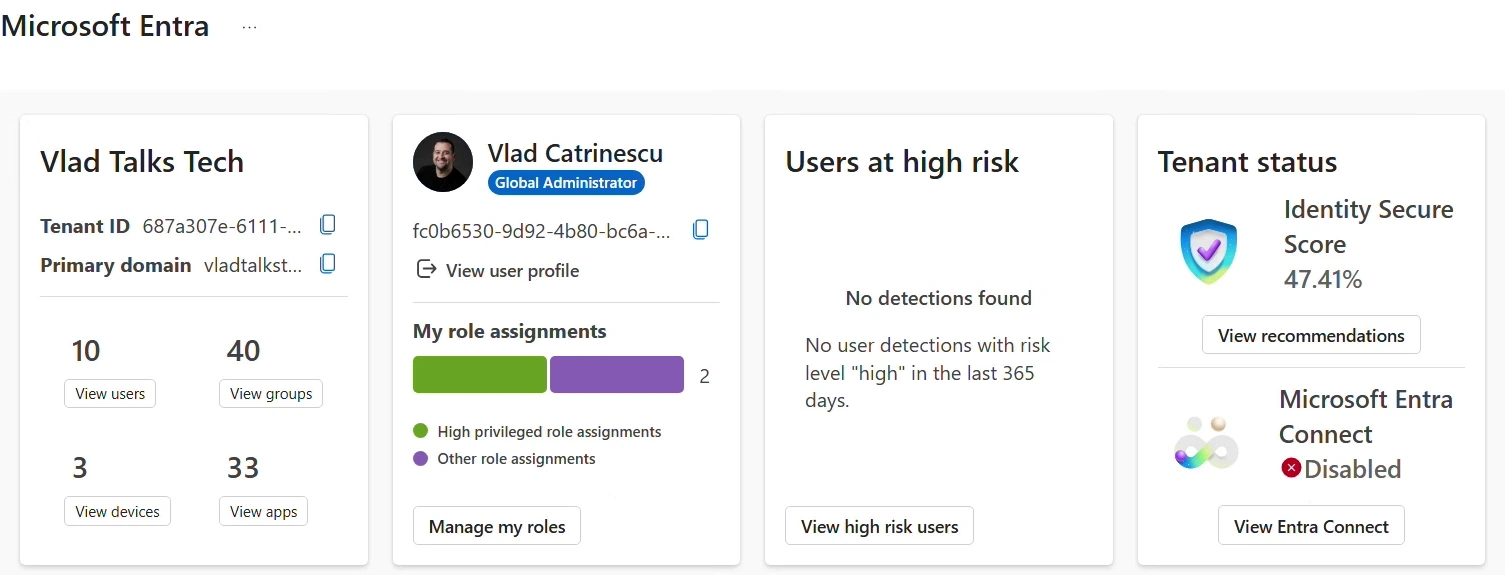
Select View recommendations, give it a second to load, and you’ll see everything you can do to improve your score. All shows every recommendation, which in my tenant includes security best practices and a few from Microsoft Defender for Identity. The Security filter narrows the list down to the ones that count toward your score.
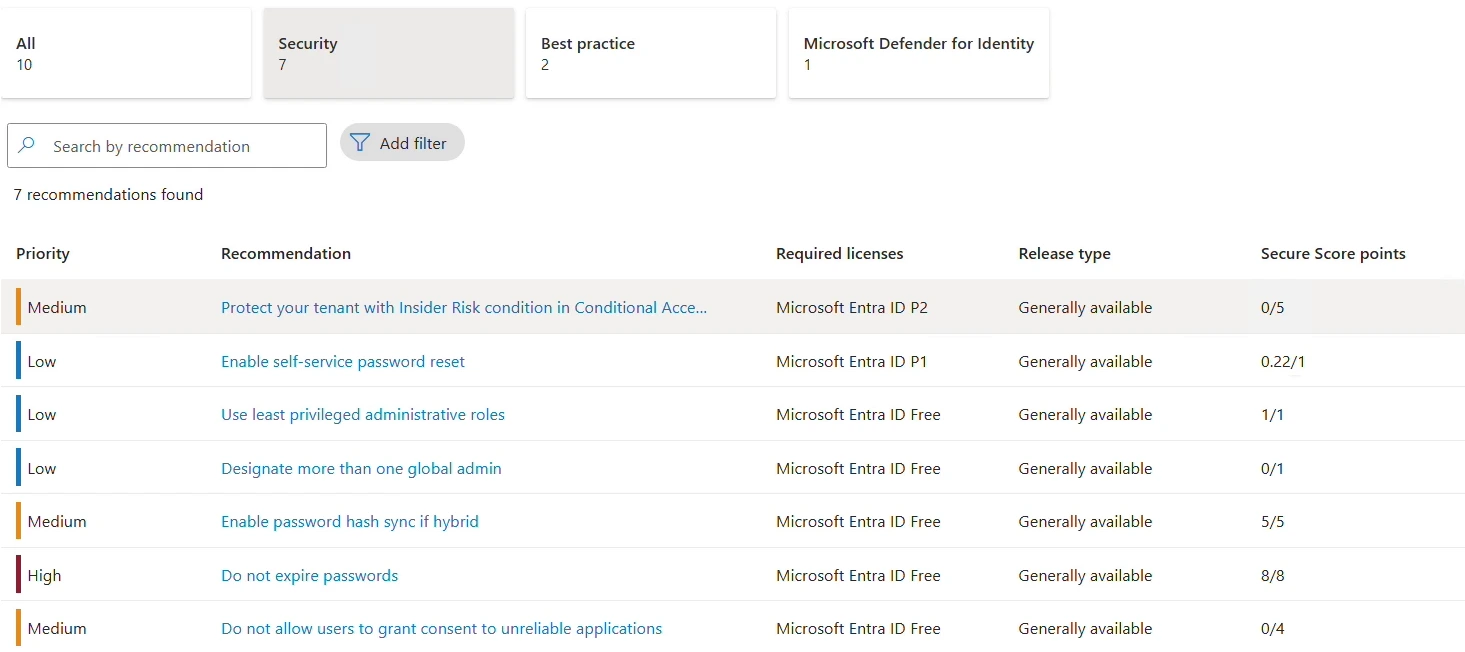
The first one on my list is Protect your tenant with Insider Risk condition in Conditional Access policy, which brings the insider risk signal from Microsoft Purview into your Conditional Access policies. It needs a Microsoft Entra ID P2 license, and completing it would get me an extra five points, which is pretty cool.
Select any recommendation and you get the full story: its status (Active, in my case), the date it was checked, and the users it affects. Right now, eight out of eight users in my tenant aren’t covered by an insider risk condition in a Conditional Access policy, so the more users I add to that policy, the better my score gets.
Why your score can go down
The second recommendation on my list, Enable self-service password reset, sits at 0.22 out of 1. That looks like a funny score until you open it and see that seven users in my tenant don’t have self-service password reset enabled, which is why I only get part of the point.
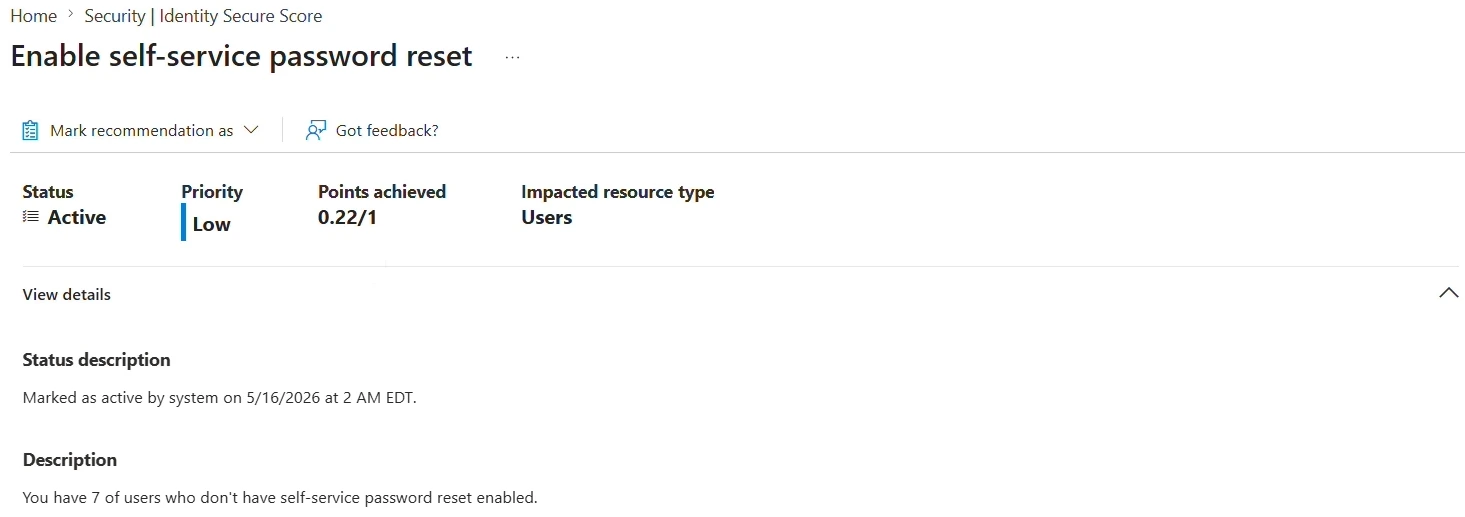
Microsoft scores some recommendations all or nothing, and others as a percentage, like the share of your users who are covered, which is exactly where a number like 0.22 comes from (Microsoft’s documentation (opens in a new tab) walks through the math). It’s also why your score can go down. If you add new users and don’t secure them properly, that one point shrinks, because a bigger share of your users is missing the recommendation.
So at a high level, that’s Identity Secure Score: a list of recommendations, plus a score that tells you where your identity security posture stands today and what you can do to improve it in Entra ID.
What this means for you
Microsoft Copilot answers with whatever each identity can reach, so your identity posture really is your Copilot posture. If you want the bigger picture on that, I cover it in why generative AI amplifies the security risks you already have.
So go check your score in the Microsoft Entra admin center today:
- Open View recommendations from the Tenant status card on the home page, and pick the Security filter.
- If Require multifactor authentication for administrative roles isn’t complete, start there, because that’s the one I’d do first.
- Check the Required licenses column before you plan anything, since some recommendations need Microsoft Entra ID P1 or P2.
- Come back often, because Microsoft keeps adding and removing recommendations as identity security evolves.
And if your sign-in risk or user risk policies still live in ID Protection, it’s time to move them to Conditional Access, because Microsoft set October 1, 2026 as the retirement date for those legacy risk policies.
Ready to prepare for the AB-900? Identity Secure Score is just one piece of my AB-900 certification path, which covers the core Microsoft 365 services, data protection and governance, and the basics of Copilot and agent administration. You’ll find this topic in Identify the Core Features and Objects of Microsoft 365 Services (opens in a new tab), the first course of the full AB-900 path on Pluralsight (opens in a new tab). And for free resources plus my notes on every skill measured, grab my AB-900 study guide.
Frequently asked questions
Is Identity Secure Score free?
Yes. Microsoft makes it available to free and paid Microsoft Entra ID customers, so every tenant has one. Some recommendations need a paid license before you can view and act on them, though, and the Required licenses column on the recommendations page tells you whether each one needs Microsoft Entra ID Free, P1 or P2.
Where do I create the sign-in risk and user risk policies now?
In Conditional Access. Microsoft set October 1, 2026 as the retirement date for the legacy risk policies in Microsoft Entra ID Protection, so the way forward is risk-based Conditional Access policies, which Microsoft recommends running in report-only mode first. Keep in mind that risk-based Conditional Access policies require Microsoft Entra ID P2.
Does a higher Identity Secure Score mean I can't be breached?
No, and Microsoft is clear about that. The score doesn't measure how likely you are to be breached; it measures how far you've adopted the features that offset risk, so instead of chasing a specific number, Microsoft recommends focusing on the high-importance recommendations that are relevant to your organization.
How do I find out why my Identity Secure Score changed?
Head to the History tab of Microsoft Secure Score in the Microsoft Defender portal. Your Identity Secure Score is the identity part of Microsoft Secure Score, with the same identity recommendations, so that History tab shows you the changes behind your score in detail.

