
SharePoint Advanced Management Roadmap: Shipped and Coming
 By Vlad Catrinescu Microsoft MVP and MCT · Pluralsight Author
SharePoint Advanced Management (SAM) has grown into a full content governance suite for Microsoft 365, with its own AI assistant on top. This post tracks the SharePoint Advanced Management roadmap against Microsoft’s own documentation. You will see what has actually shipped, what Microsoft has said is still coming, and what each part means for you.
This roadmap check is accurate as of August 2026. Roadmap items move quickly, so status and dates can change after this date. Where something is documented, I link to Microsoft Learn. Where it is not, I attribute it to the product team and date it.
Key takeaways
- The SharePoint Admin Agent is live. It answers governance questions in plain language and needs the new SharePoint Advanced Management Administrator role.
- Catalog management, the content management assessment, and item-level oversharing reports have all shipped and are documented on Microsoft Learn.
- Two things Microsoft framed as “coming” have since shipped: Microsoft Agent 365 (generally available since May 1, 2026) and the mid-2026 feature wave.
- Some pieces are still on the way, including a site owner governance experience (name not final), catalog-scoped policies, and sensitive info type data in the permission report.
- Licensing matters. SAM needs a Microsoft 365 Copilot license, the SAM add-on, or Microsoft 365 E7. Microsoft 365 E5 on its own gives you reporting only.
What SharePoint Advanced Management can do today
Most of the roadmap is already real. Here is what is documented and available right now.
The SharePoint Admin Agent
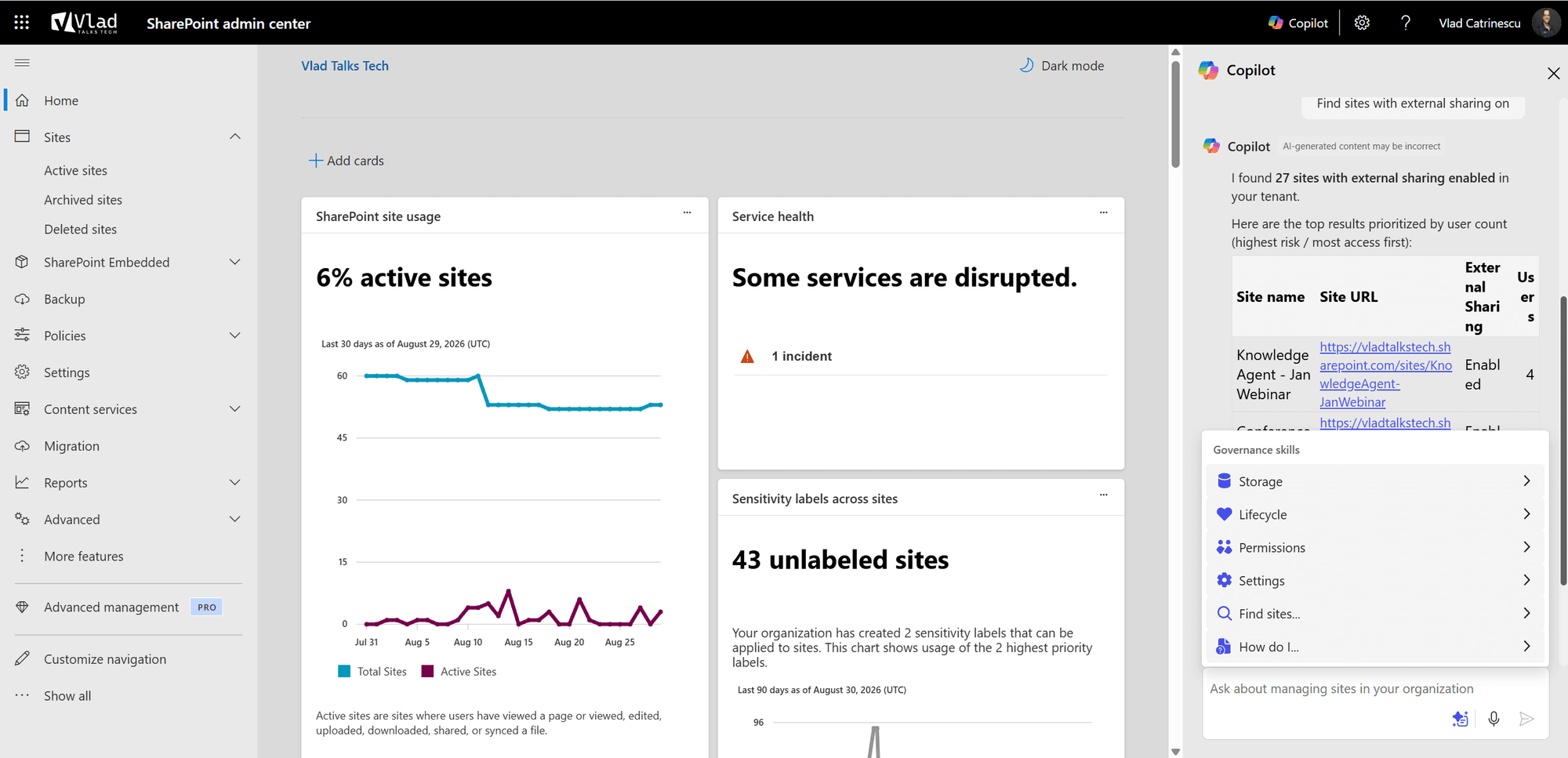
The headline feature has shipped. The SharePoint Admin Agent (opens in a new tab) is an AI-powered governance assistant that reasons over your SharePoint and SAM data. You ask a question in plain language, and it returns analysis and guided remediation. You can open it in the Microsoft Copilot app, in the SharePoint admin center, or in Microsoft Teams.
Where to start: the content management assessment
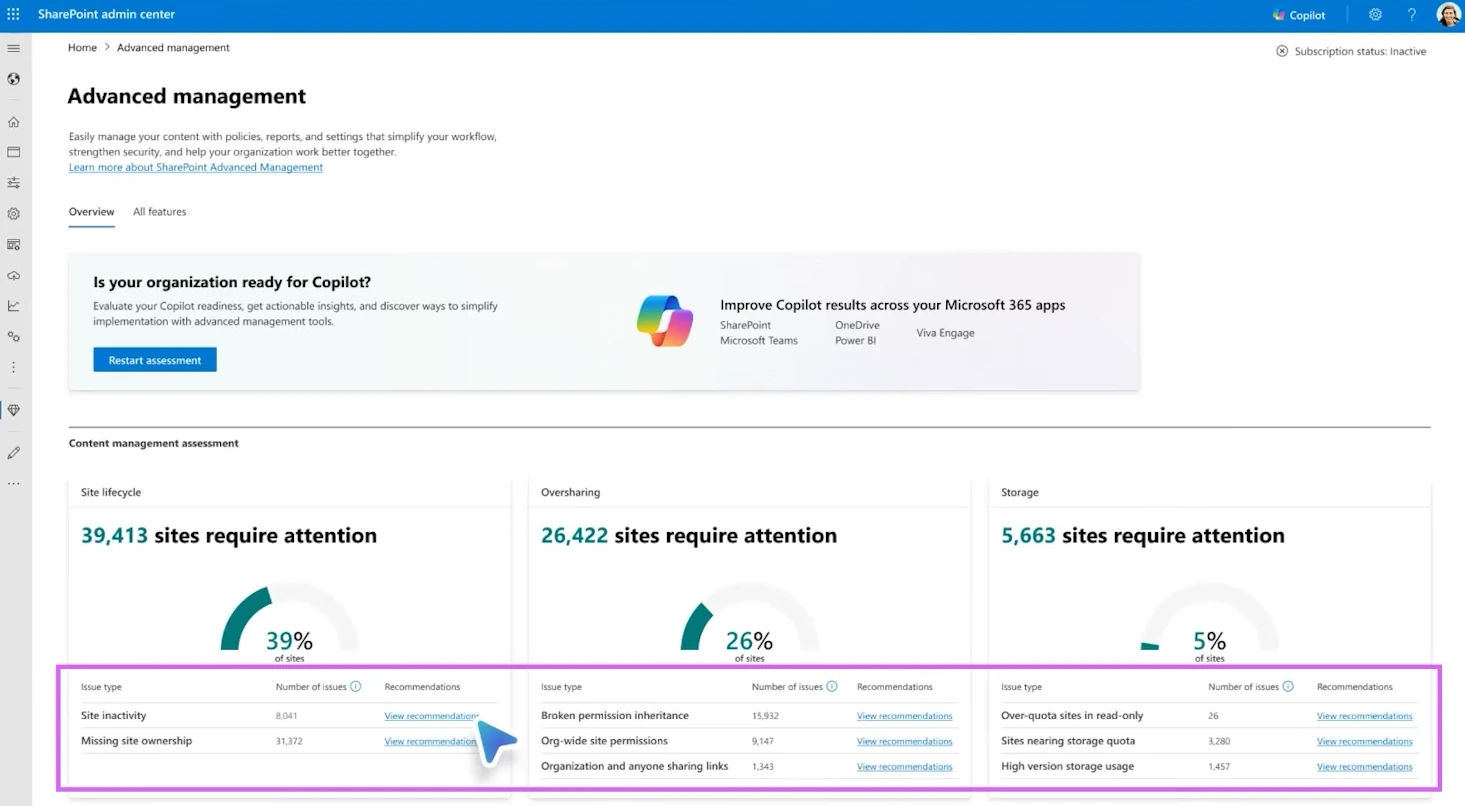
Not sure where to begin? Run the content management assessment (opens in a new tab). Open Advanced Management in the SharePoint admin center navigation pane and select Start assessment. SAM then runs a suite of reports and flags the sites that need attention.
The assessment covers five areas: inactive sites, site ownership, broken inheritance, sharing with Everyone except external users, and overly permissive sharing links. Microsoft recommends rerunning it every 30 days.
One caveat on timing, because two different reports quote different windows. The assessment page lists a run time of 2 to 72 hours, depending on tenant size. The separate site permissions snapshot report (opens in a new tab) is slower. Microsoft says its first run can take up to 5 days, regardless of tenant size. Either way, start early and do not expect instant results.
Catalog management: structure your sites
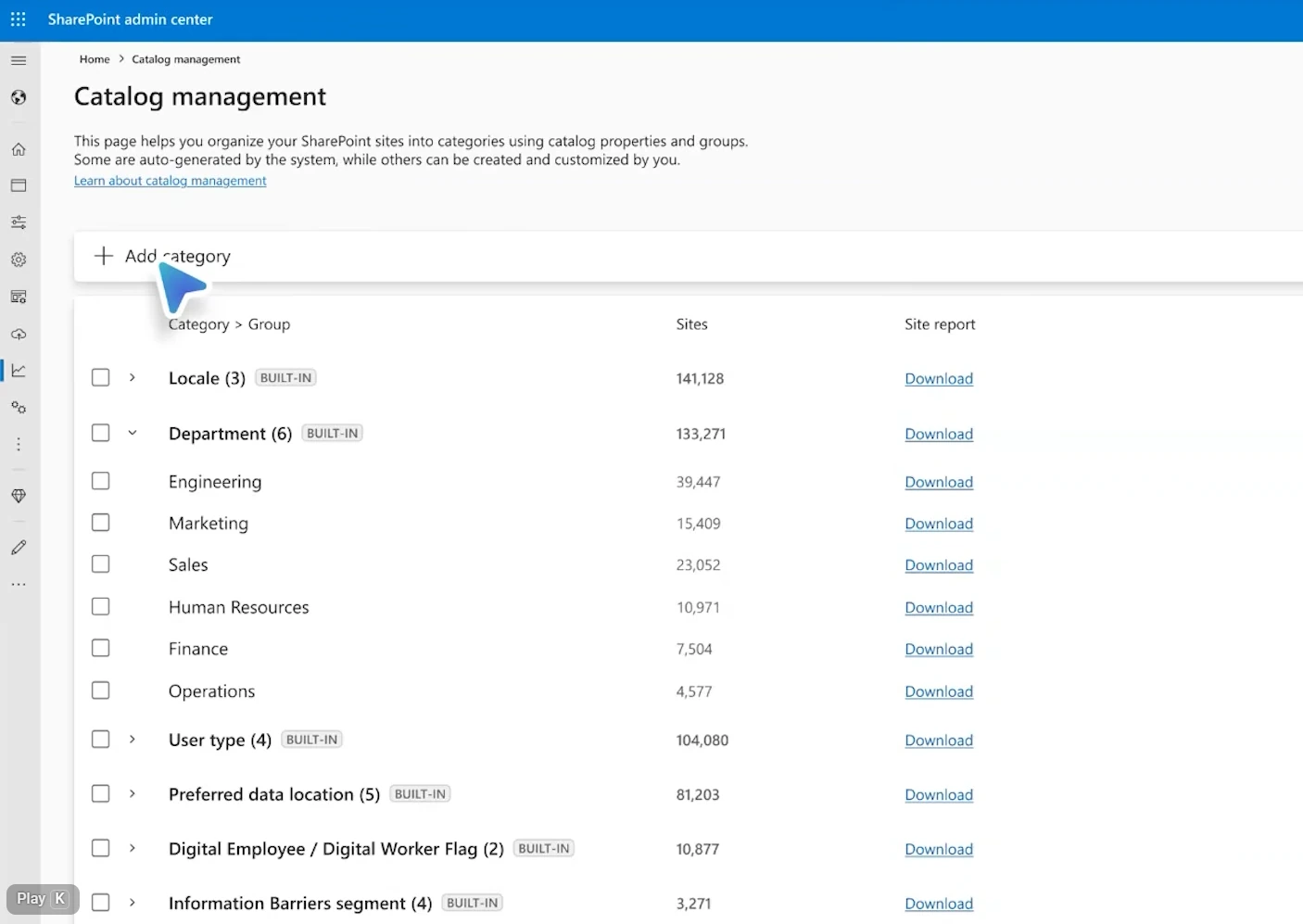
Catalog management has shipped, including the custom options. It groups your sites into categories and groups. That structure then lets the SharePoint Admin Agent give more targeted insights instead of reasoning over everything at once.
Out of the box, catalog management (opens in a new tab) builds categories from Microsoft Entra ID and SharePoint metadata, such as department and locale. These refresh every hour. You can also build your own categories three ways:
- CSV upload: create curated categories with up to 20 groups each.
- Custom site property: point SAM at a site property, such as a cost center, and it creates one group per value. This option covers up to 20,000 sites.
- Microsoft Entra ID extension attributes: group sites by the values in extension attributes 1 through 15.
One gap is worth noting. Catalog management groups SharePoint sites, and the documentation does not mention SharePoint Embedded containers.
Oversharing reports and the new admin role
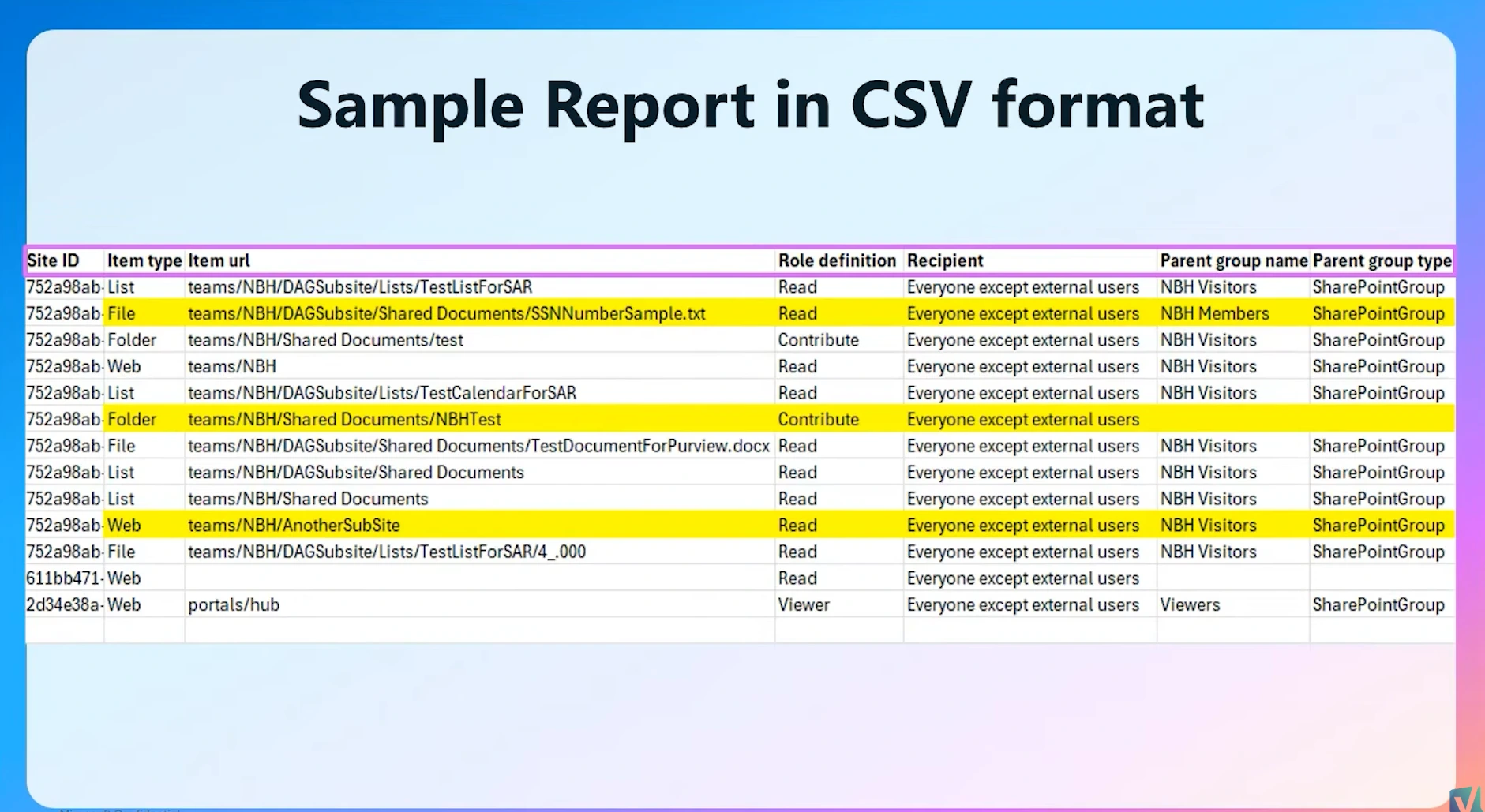
The permission state report is still the flagship oversharing tool. The bigger news is file-level reporting. A new report, Sites and files shared via special SharePoint groups (opens in a new tab), has shipped. It lists the items shared with Everyone except external users (EEEU) or Everyone. It is a downloadable export of up to 1 million rows, not a dashboard.
File-level data comes with a stricter security model. The SharePoint Advanced Management Administrator role is required to run these reports. It is a superset of the SharePoint Administrator role. Even a Global Administrator cannot view file properties across sites they do not own without it.
Two more oversharing tools are live. Site access reviews (opens in a new tab) let you ask site owners to fix overshared sites, up to 100 sites per request, and up to 1,000 reviews a month from the organization-wide permissions report. Restricted Content Discovery (opens in a new tab) removes AI entry points, such as the Copilot button and agent creation, from a site. You can also delegate it to site administrators.
Agent access insights
Agents now leave a trail across your content, and you can see what they touch. The agent access insights report (opens in a new tab) lists the agents reaching your SharePoint and OneDrive content. You find it in the SharePoint admin center under Reports, then Agent insights, for the past 1, 7, 14, or 28 days.
The report covers SharePoint agents, declarative agents, and custom agents. From the report, you can act right away by applying Restricted access control or Restricted Content Discovery to a site.
Resilience: settings and backup
Resilience is the newest pillar, and the agent surfaces most of it. Ask the agent whether Baseline Security Mode is enabled, and it returns a status. Ask about recovery options, and it reasons over your Microsoft 365 Backup state.
Multi-Geo, in preview
Multi-Geo has a start, but it is still preview. On Microsoft Learn, the agent’s cross-geography content move prompts are marked as preview. They let you check the status of cross-geo moves and find libraries that need to move.
What’s still coming on the SharePoint Advanced Management roadmap
The rest of the list is not documented yet. These points come from Dave Minasyan, the Principal Product Manager who leads SAM at Microsoft, in our 2026 conversation. I am reporting them as his statements at the time of recording, not as shipped features. As someone who has presented on SAM at conferences for years, I would treat this section as direction, not dates.
- A storage card in the assessment. Dave said storage analysis is coming to the content management assessment. Today the assessment documents five reports, and storage is not one of them.
- SharePoint Embedded containers in catalog management. Dave said onboarding containers to SAM is in progress. It is not documented yet.
- Catalog-scoped policies. Dave described scoping lifecycle policies to a catalog category. The policy documentation still lists other scopes only.
- Batched emails and a site owner governance hub. Dave described batched emails, one for lifecycle and one for oversharing, plus a single hub page for site owners. He added that the governance hub name is not final. Microsoft documents per-report tailored emails today, not the batched model or the hub.
- Sensitive info type in the permission report. Dave said Microsoft is working with Purview to bring sensitive file type data into the permission state report. Note one nuance: the site-level sensitivity label already appears in the report. The file-level sensitive info type integration is the part still coming.
- Deeper agent insights. A heat map view and richer agent owner details are still developing.
- Cross-workload governance. Dave said Microsoft wants to bring content governance context to Teams and Exchange admins. It is not documented yet.
- A growing agent skill set. Dave said the agent’s skills will keep expanding. The specific counts he shared are not documented, so I am leaving numbers out.
Two things that shipped since this was recorded
Roadmap content dates fast, and this conversation is a good example. Two things Dave described as coming have since shipped.
First, Microsoft Agent 365. At the time of recording, Dave described it as “going to be coming in.” Microsoft Learn now states that Microsoft Agent 365 is generally available as of May 1, 2026 (opens in a new tab). It is a separate product from the SharePoint Admin Agent, and it acts as a control plane to observe, govern, and secure agents.
Second, the mid-2026 wave. Dave pointed to a June, July, and August release window. That window has effectively closed, and the named items landed inside it. Catalog custom groups and the item-level oversharing report are both documented and live today.
Licensing and availability: what you actually need
The roadmap conversation skips licensing, so here are the details from Microsoft Learn.
You need a qualifying base subscription first. That means Office 365 E3, E5, or A5, or Microsoft 365 E1, E3, E5, or A5, or a government plan.
Then you unlock SAM one of three ways, per the prerequisites (opens in a new tab):
- at least one Microsoft 365 Copilot license assigned in the tenant,
- the SharePoint Advanced Management Plan 1 add-on (on a SharePoint K, P1, or P2 plan), or
- Microsoft 365 E7, also called the Frontier Suite.
Microsoft 365 E5 on its own is not enough for the full suite. Microsoft documents this clearly. An E5 admin without Copilot gets data access governance reporting (opens in a new tab) only. There are no snapshot reports, no remedial actions, and activity reports return up to 10,000 sites.
Sovereign clouds are supported, with gaps. Microsoft 365 operated by 21Vianet does not support data access governance reports or site access reviews, even with the required licenses.
Finally, plan for the role. The SharePoint Advanced Management Administrator role is a superset of the SharePoint Administrator role, and it gates file-level reporting. Even Global Administrators must assign the role before file-level reports will run.
What this means for you
Start with the free wins. Run the content management assessment if you have SAM. It is one click, and the results guide everything else. Because it can take up to 72 hours, start it early and put a monthly rerun on your calendar.
Next, plan your structure. Sketch catalog categories that match how your organization works, and clean up your Microsoft Entra ID department attributes so sites do not pile into an “other” bucket. Good structure makes every report and policy more precise.
Then sort out access and licensing. Decide who gets the SharePoint Advanced Management Administrator role, since file-level reports will not run without it. Confirm which license path unlocks SAM for you, and check the E5 and 21Vianet limits if either applies.
One last habit for roadmap content: treat status as a moving target. Two items in this very conversation shipped before this post went live. Re-check Microsoft Learn before you promise a feature to your organization.
Want the full walkthrough of each feature? I broke down every part of the 2026 wave in my guide to what’s new in SharePoint Advanced Management. I also covered the licensing model in my SharePoint Advanced Management licensing Q&A with Microsoft. For the agent governance side, see my recap of Agent 365 from the ESPC keynote. To keep up as the roadmap ships, subscribe to the Vlad Talks Tech newsletter at vladtalkstech.com.
Frequently asked questions
Is the SharePoint Admin Agent available now?
Yes. The SharePoint Admin Agent is live and documented on Microsoft Learn. You open it in the Microsoft Copilot app, the SharePoint admin center, or Microsoft Teams. You need the SharePoint Advanced Management Administrator role to use it.
Do I need Microsoft 365 Copilot to use SharePoint Advanced Management?
Not exactly. You unlock SAM with at least one Microsoft 365 Copilot license in the tenant, the SharePoint Advanced Management Plan 1 add-on, or Microsoft 365 E7. Microsoft 365 E5 on its own gives you data access governance reporting only, with no snapshot reports or remedial actions.
What is the SharePoint Advanced Management Administrator role?
It is a role that includes everything the SharePoint Administrator role does, plus advanced governance capabilities such as file-level reporting. It is required for the new oversharing file reports. Even Global Administrators must assign it before they can view file properties across sites they do not own.
Is Microsoft Agent 365 the same as the SharePoint Admin Agent?
No. They are different products. Microsoft Agent 365 is a control plane to observe, govern, and secure agents across your tenant, and it is generally available. The SharePoint Admin Agent is a governance assistant focused on SharePoint and SAM data.

