
How Microsoft Copilot Accesses Your Work Data and the Web
 By Vlad Catrinescu Microsoft MVP and MCT · Pluralsight Author
Microsoft Copilot (formerly Microsoft 365 Copilot) sees the same data as your users, but how does it actually access and use it? Copilot doesn’t directly access your data, and it doesn’t just open up SharePoint and start reading files. The process involves several different systems and safety checks, and as an IT professional, understanding how it works gives you the mental model behind the protection and governance tools you’ll use with Copilot.
Key takeaways
- Copilot doesn’t read your files directly. It grounds your prompt with Microsoft Graph and Work IQ before anything reaches the large language model.
- Copilot checks that the user can access the content, respects Restricted Content Discovery and Restricted SharePoint Search, and applies your Purview labels and data loss prevention policies.
- The prompt you type isn’t the prompt the large language model receives, because Copilot modifies it along the way.
- When Copilot needs the web, it sends Bing a short, anonymized query, not your full prompt, your files or your identity.
- Your work data stays inside your Microsoft 365 service boundary, and admins can turn web search off.
Why Copilot data access matters for IT pros
We already know that Microsoft Copilot can access your data. If you manage a Microsoft 365 tenant, you also need the technical details of how it gets to that data, especially your work data.
Microsoft also uses a lot of different product names here, some more technical and some more marketing, especially in the Copilot ecosystem. You’ll often see Microsoft Graph, Work IQ and even more advanced terms like the semantic index. I’m going to focus on what’s in scope for the AB-900 exam, so let’s start with two definitions.
Microsoft Graph and Work IQ explained
Microsoft Graph is the index of your tenant. Everything Microsoft 365 already knows about your users’ files, mail, chats, meetings and calendars sits in or behind Microsoft Graph. It’s really the catalog, and it has been around for a while: the Microsoft Graph API went generally available in November 2015, and most documentation today still references Microsoft Graph when it talks about how Copilot accesses data. If you’re a developer, you probably use the Microsoft Graph API every single day.
Work IQ is the layer that takes Copilot to the next level. It doesn’t only have access to the data, it also has memory and inference, so Copilot understands what matters to you. That means who you collaborate with the most, the topics you focus on day to day, the projects you actually spend time in, and the files you really open compared to the ones you needed on a previous project that aren’t relevant anymore.
Work IQ is much newer. It launched at Microsoft Ignite in November 2025, around the same time as the AB-900 exam. Think of Work IQ as the personalized layer on top of Microsoft Graph. They work together to give Copilot its power.
How Copilot accesses your work data
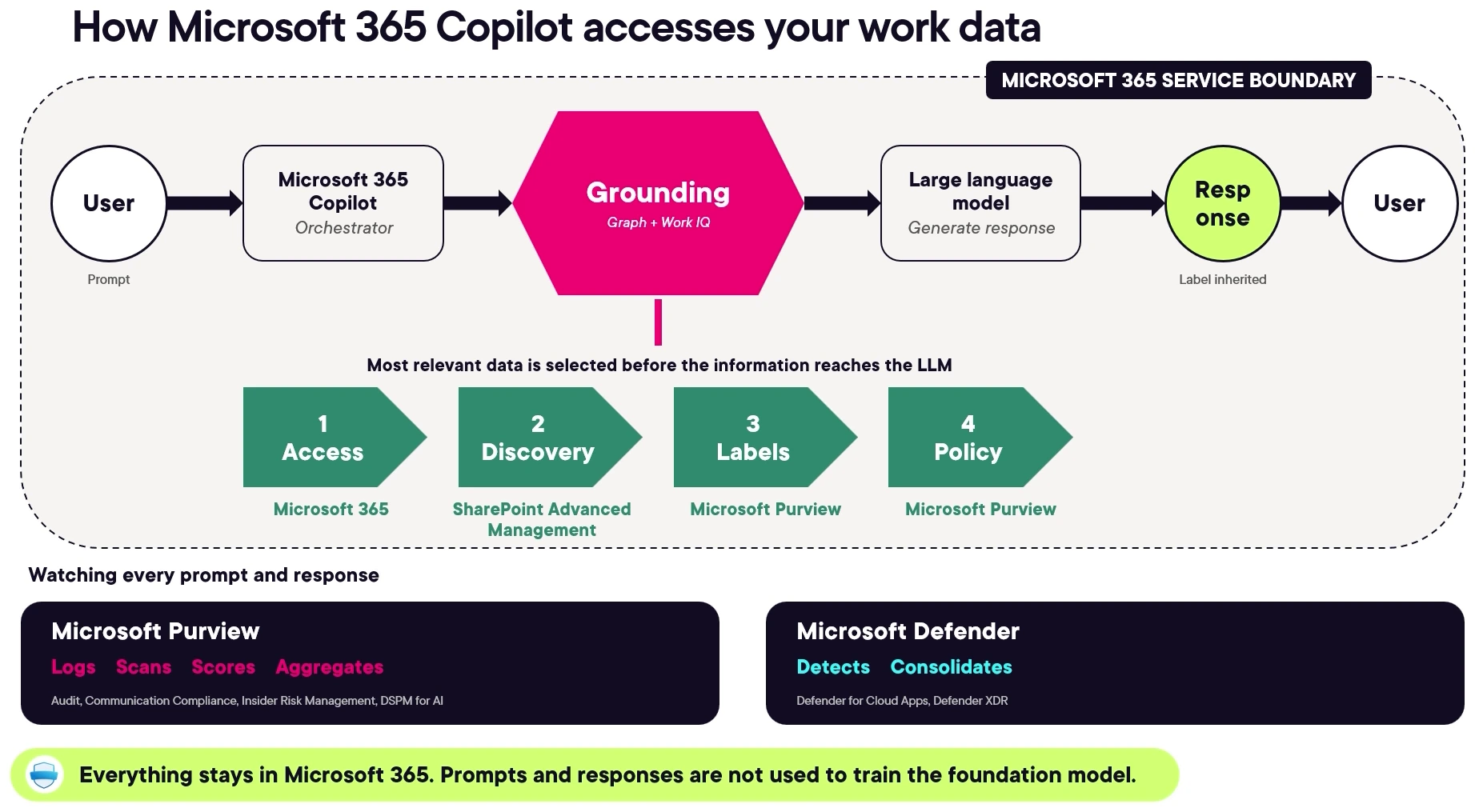
It all starts with the user, who writes a prompt in Microsoft Copilot. Copilot acts like an orchestrator, and the first thing it needs to do is ground that prompt, which means finding the information from your organization that helps answer it. Here it uses both Microsoft Graph and Work IQ, and the goal is to select the most relevant documents before anything is sent to the large language model.
This is important, because it’s part of the value Microsoft adds. The relevant documents, emails and information are selected by the orchestrator before they ever reach the large language model.
The safety checks before the large language model
Microsoft also checks several things about those documents before they get to the model:
- Does the user have access to those documents?
- Are there restrictions, like Restricted Content Discovery or Restricted SharePoint Search, that say this content shouldn’t show up in Copilot?
- Are there Microsoft Purview sensitivity labels or data loss prevention policies that change how Copilot can handle the data it found?
After Copilot does all of that, it combines the information and sends it to the large language model as part of your prompt.
Your prompt isn’t the prompt the model receives
The prompt the user types isn’t the same prompt that gets sent to the large language model. Copilot modifies that prompt a lot before it gets there, including for responsible AI. That’s also why you sometimes get different results between ChatGPT and Microsoft Copilot, even on general knowledge questions, when they use the same model in the back.
The answer then goes back to the user. Since Copilot checks things like Purview, if content was generated from data with a sensitivity label, the content Copilot generates keeps that label. Tools like Microsoft Purview and Microsoft Defender monitor everything, so every interaction is logged and any suspicious prompts are escalated to the admin team. And everything that has to do with your work data remains inside your Microsoft 365 service boundary and respects your service agreement.
How Copilot accesses web data
Web data works differently. This is when Copilot needs to go to the public web to get information that improves the answer to your prompt, or when you ask it to research the web.
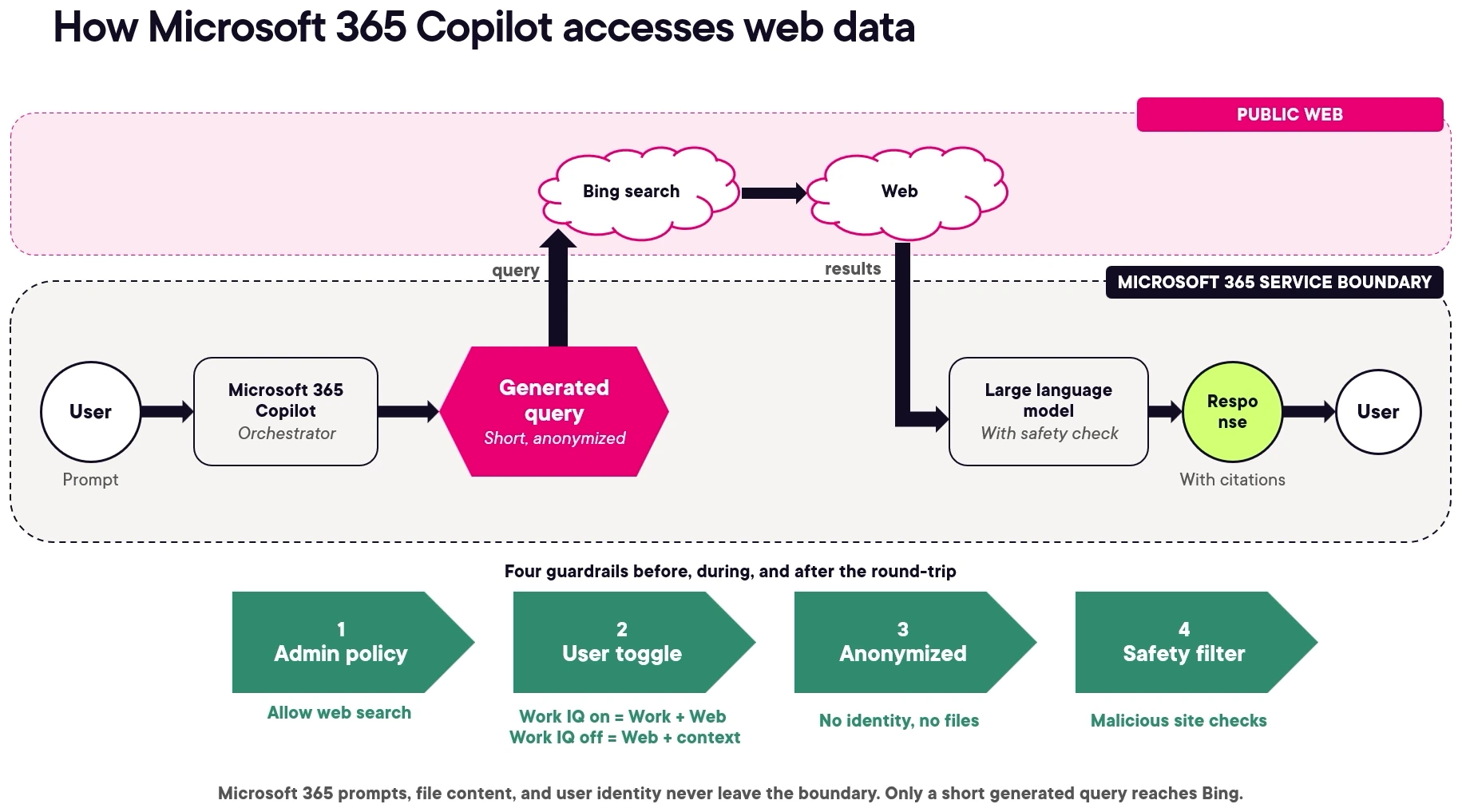
Everything starts the same way. The user sends Microsoft Copilot a prompt, the orchestrator decides it needs data from the web, and Copilot creates a short, anonymized query stripped of your identity, with no file information. It sends that query to Bing, which gets the information from the public internet. That part is outside your Microsoft 365 service boundary, so when it comes to web data, you’re leaving that trusted boundary before going back to the large language model.
Even when the query leaves your boundary, there are still safety guardrails:
- Admins can turn web search off. Because data leaves the tenant, even anonymized, some organizations prefer to disable it.
- Users can switch between work and web. In work mode, Copilot can use their work data as well as the web. In web mode, it uses the web and the context they give it, but not their work data.
- The query is anonymized. No identity and no files leave your tenant.
- A safety filter runs before the answer gets back to the user. The answer also comes with citations, so the user can verify where the information came from.
So yes, some information does leave your service boundary, but it’s only a short query generated by Copilot. It’s not the full prompt, it’s not any file, and the user’s identity stays safe inside the tenant.
Four things to remember for the AB-900 exam
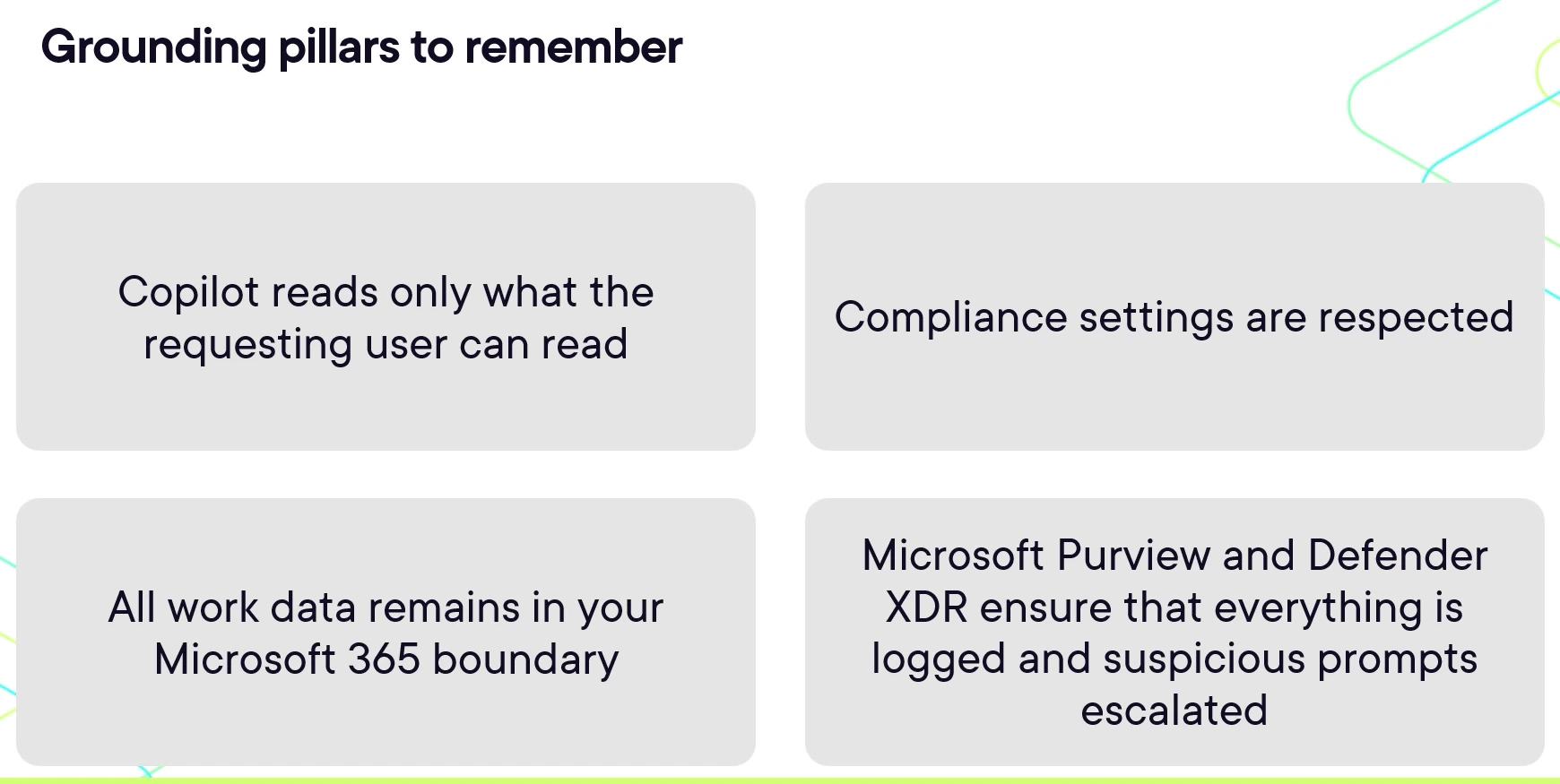
There are four things I want you to remember for the AB-900 exam about how Copilot keeps your information safe:
- Copilot reads only what the requesting user can read. No backdoors, no elevated service account, no admin shortcut. It will never surface data the user doesn’t have access to.
- Copilot always respects your compliance settings, such as data loss prevention policies, sensitivity labels and data residency.
- Your work data stays in your Microsoft 365 boundary, including your documents and identities.
- Microsoft Purview and Microsoft Defender XDR make sure everything is logged, and anything suspicious is escalated according to the policies you have in place.
Microsoft sometimes groups those into four principles: data minimization, transparency, content filtering and auditability. My AB-900 study guide maps the rest of the skills measured.
What this means for you
So the work answers follow your permissions, and the web answers? Well, that’s a switch. Both are things you control as an admin, which is why this mental model matters before you roll Copilot out.
On the work side, Copilot only shows people what they can already access, so the protection and governance tools you already have, from permissions to Restricted Content Discovery to Purview labels and data loss prevention, are the tools that shape what Copilot can use. On the web side, decide whether your organization is comfortable with an anonymized query leaving the service boundary. The control is the Allow web search in Copilot policy, which Microsoft documents in its data, privacy and security guide for web search in Copilot (opens in a new tab).
If you’re preparing for the exam, those four points are the ones to know cold. I also shared what to expect on the AB-900 exam after I took it.
Ready to get AB-900 certified? This lesson is part of my AB-900 certification path on Pluralsight, which covers the core Microsoft 365 services, data protection and governance, and the basics of Copilot and agent administration. Later in the path, I show you exactly where to turn web search on or off in the Microsoft 365 admin center. Start the AB-900 path on Pluralsight (opens in a new tab).
Frequently asked questions
Does Microsoft Copilot send my whole prompt to Bing?
No. Copilot generates a short search query of a few words from your prompt and sends only that to Bing. Microsoft documents that the full prompt is included only when the prompt itself is very short, like "local weather". Entire files and identifying information such as your username, domain or tenant ID are never part of the query.
How do I turn off web search in Microsoft Copilot?
Use the Allow web search in Copilot policy in the Cloud Policy service for Microsoft 365. The Microsoft 365 admin center links to it under Copilot, Settings, Data access. When an admin turns web search off, the Web content toggle appears dimmed and users can't turn it back on.
Can admins see the web queries Copilot sends to Bing?
Yes. Microsoft logs the exact web search queries Copilot generates, so admins can search, audit and run eDiscovery on them alongside prompts and responses. Users also see the queries in the citations of a Copilot Chat response, for 24 hours.
Is Copilot data access on the AB-900 exam?
Yes. "Understand how Copilot accesses data" is one of the skills measured, in the data protection and governance area that makes up 35 to 40 percent of the exam. Focus on four points: Copilot reads only what the user can read, respects your compliance settings, keeps work data in your Microsoft 365 boundary, and logs everything through Purview and Defender XDR.

