
Microsoft 365 Content Governance: The Five Pillars
 By Vlad Catrinescu Microsoft MVP and MCT · Pluralsight Author
Microsoft 365 content governance is now built on five pillars instead of three. For the past few years, the model was sprawl control, oversharing control, and lifecycle management. Microsoft has added content relevance and content resilience to that list, and the reason matters more than the vocabulary: governance stopped being a project you finish before deploying Copilot and became something you run continuously.
Key takeaways
- Microsoft 365 content governance now covers five pillars: sprawl, oversharing, lifecycle, relevance, and resilience.
- The three original pillars are unchanged. Relevance and resilience are additions, not replacements.
- Content relevance is about whether the content AI retrieves is worth retrieving. Most tenants have never measured this.
- Content resilience covers your tenant’s configuration posture, backup state, and recoverability.
- Microsoft deliberately moved away from framing this as Copilot readiness, because readiness implies a finish line that does not exist.
From three pillars to five
If you have followed SharePoint Advanced Management (SAM) over the last few years, you know the three-pillar model well. Sprawl control, oversharing control, and lifecycle management have anchored every roadmap slide and every conference session on the topic, including mine.
Those three are not going anywhere. What changed is that Microsoft added two more investment areas, content relevance and content resilience, and rebuilt the surrounding story around all five. Dave Minasyan, the Principal Product Manager who leads SAM at Microsoft, put it plainly when we spoke: the environment changed, agents and AI came into the picture, and the footprint of content governance had to grow with it.
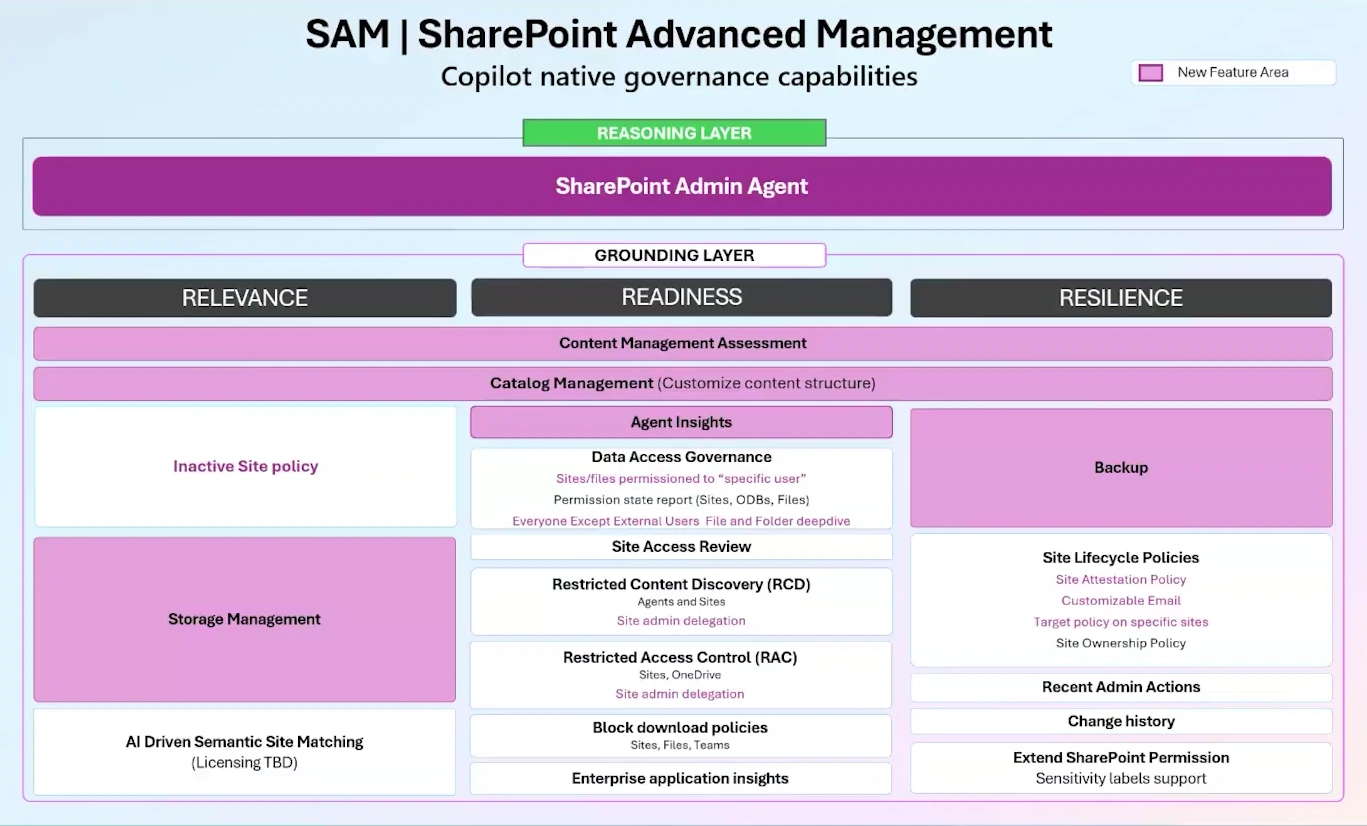
Having presented on SAM at conferences for the past three years, I have watched this go from a topic that fit comfortably in a 45-minute session to something that genuinely does not. That growth is the context for the two new pillars.
The three original pillars still do the heavy lifting
Before getting to what is new, it is worth being precise about what the original three actually cover, because the boundaries between them are fuzzier than most people assume.
Sprawl control
Sprawl is the problem of content you did not know you had. Sites created for a project that ended two years ago, sites with no owner, sites nobody can account for. The tooling here is about detection and accountability: site ownership policies that enforce a minimum number of owners, inactive site policies that find stale content and act on it, and site attestations that ask owners to periodically confirm their site still needs to exist.
Attestation is the underrated one. It is the only proactive tool in the set. Run it regularly, and you have dramatically less to clean up reactively.
Oversharing control
Oversharing is content that is accessible to more people than it should be. Microsoft’s framework here recognizes five basic oversharing patterns, which together account for the large majority of what Microsoft sees across tenants. The tools are data access governance reports, site access reviews, restricted access control, and restricted content discovery.
The reason oversharing became urgent is not that permissions got worse. It is that AI made existing permissions visible. A file that was technically accessible to everyone in the company but buried six clicks deep was, practically speaking, private. Copilot removed the burial.
Lifecycle management
Lifecycle is about content having a defined end state rather than accumulating forever. Archiving, retention, version management, and the policies that move content through those stages. Microsoft 365 Archive and intelligent versioning both sit here.
Content relevance: the pillar most tenants are not ready for
Relevance is the genuinely new idea, and it is the one I would spend time thinking about now.
The other four pillars ask whether content is accessible to the right people and whether it should still exist. Relevance asks a different question: when an AI system retrieves this content to answer a question, is the answer any good?
That is not the same as accuracy or permissions. A document can be correctly permissioned, actively used, and still be the wrong thing for Copilot to surface, because there are four near-identical versions of it, or because it was superseded eighteen months ago and nobody archived the original, or because the site it lives in has no signal indicating which department owns it.
Microsoft has been explicit that governed, relevant content produces better Copilot and agent responses. What Microsoft has not yet done is fully define the measurement. This pillar is the least built out of the five, and it is fair to say the shape is still emerging. What is already clear is the direction: structure your content estate so that both humans and agents can tell what belongs to whom.
Content resilience: governance that survives a bad day
Resilience is the fifth pillar and the most operational. It covers three things: whether your tenant configuration meets a defensible security baseline, whether your content is backed up, and whether you could actually recover it.
The capabilities Microsoft associates with this pillar are Baseline Security Mode settings, Microsoft 365 Backup, and version history. Individually, these are not new. Grouping them under governance is.
The logic is worth following. If governance is the discipline of controlling your content estate, then a tenant that cannot be restored is not governed, no matter how clean its permissions are. Resilience is the pillar that acknowledges governance has to hold up under failure, not just under audit.
Why Microsoft 365 content governance stopped being a Copilot readiness story
This is the shift I find most interesting, and it is the one most likely to affect how you pitch this work internally.
SAM was originally positioned around Copilot readiness. That framing did its job: it gave organizations a concrete reason to care about permissions and content hygiene at exactly the moment they were being asked to deploy AI. But readiness implies a finish line, and there isn’t one. You do not clean your tenant, declare it ready, and stop.
Microsoft repositioned the whole suite around content governance instead, because that is what customers were actually asking for. The demand did not come from AI deployment teams. It came from administrators who wanted the footprint of governance to grow, independent of whatever Copilot was doing.
There is a practical consequence here. If you have been justifying governance work internally as a prerequisite for a Copilot rollout, that argument has a shelf life, and it expires the day the rollout finishes. The stronger case is the one Microsoft is now making: cleaning up your content estate improves search, security, and storage regardless of your AI plans. AI is an amplifier, and it will amplify whatever state your tenant is in. I made that case in more detail when I wrote about why AI is the ultimate amplifier of existing security risk.
How to sequence the five pillars
Five pillars is a lot to look at, and the most common reaction I hear from administrators is not “we need more tools”; it is “where do I even start?” Dave described exactly the same shift in customer feedback: the complaint used to be that SAM did not have enough, and now it is that there is so much it is hard to know where to begin.
Here is the order I would work in.
Start with oversharing, not sprawl. Oversharing is the only pillar where the downside is a security incident rather than wasted storage. It also produces the findings most likely to get you budget and attention.
Do lifecycle second, because it prevents the sprawl work from repeating. Cleaning up ownerless and inactive sites without a policy that stops new ones from accumulating means doing the same cleanup again next year.
Do sprawl third, scoped rather than tenant-wide. A tenant-wide cleanup is intimidating enough that it usually does not happen. Scoping the work to one department at a time turns it into a series of finishable sprints.
Treat relevance as a planning activity right now, not an execution one. The tooling is still arriving. What you can do today is make sure your Microsoft Entra ID metadata is populated, because department attributes are what let any of this be scoped by team rather than by guesswork.
Fold resilience in as a periodic review. It is the one pillar that is genuinely a checkpoint rather than a project: confirm your configuration posture, confirm your backup state, move on.
For the specific features shipping against each of these pillars, along with dates and rollout details, see my full breakdown of what’s new in SharePoint Advanced Management for 2026.
What this means for you
The five-pillar model is not a product announcement; it is a planning framework, and that makes it more durable than any individual feature. Features will ship and get renamed. The five questions the pillars ask (is content overshared, does it have an owner and an end state, is it worth retrieving, and could you get it back) will still be the right questions in three years.
Two concrete things to do this quarter. First, audit your Microsoft Entra ID department attributes. Almost every scoping capability across all five pillars depends on being able to associate a site with a team, and that association is derived from owner metadata. If that data is thin, everything downstream is thin.
Second, decide which pillar you are actually being measured on. Most administrators are resourced for one, not five. Knowing whether your leadership cares about the security exposure, the storage bill, or the Copilot rollout tells you which pillar to lead with, and the other four become the roadmap rather than the backlog.
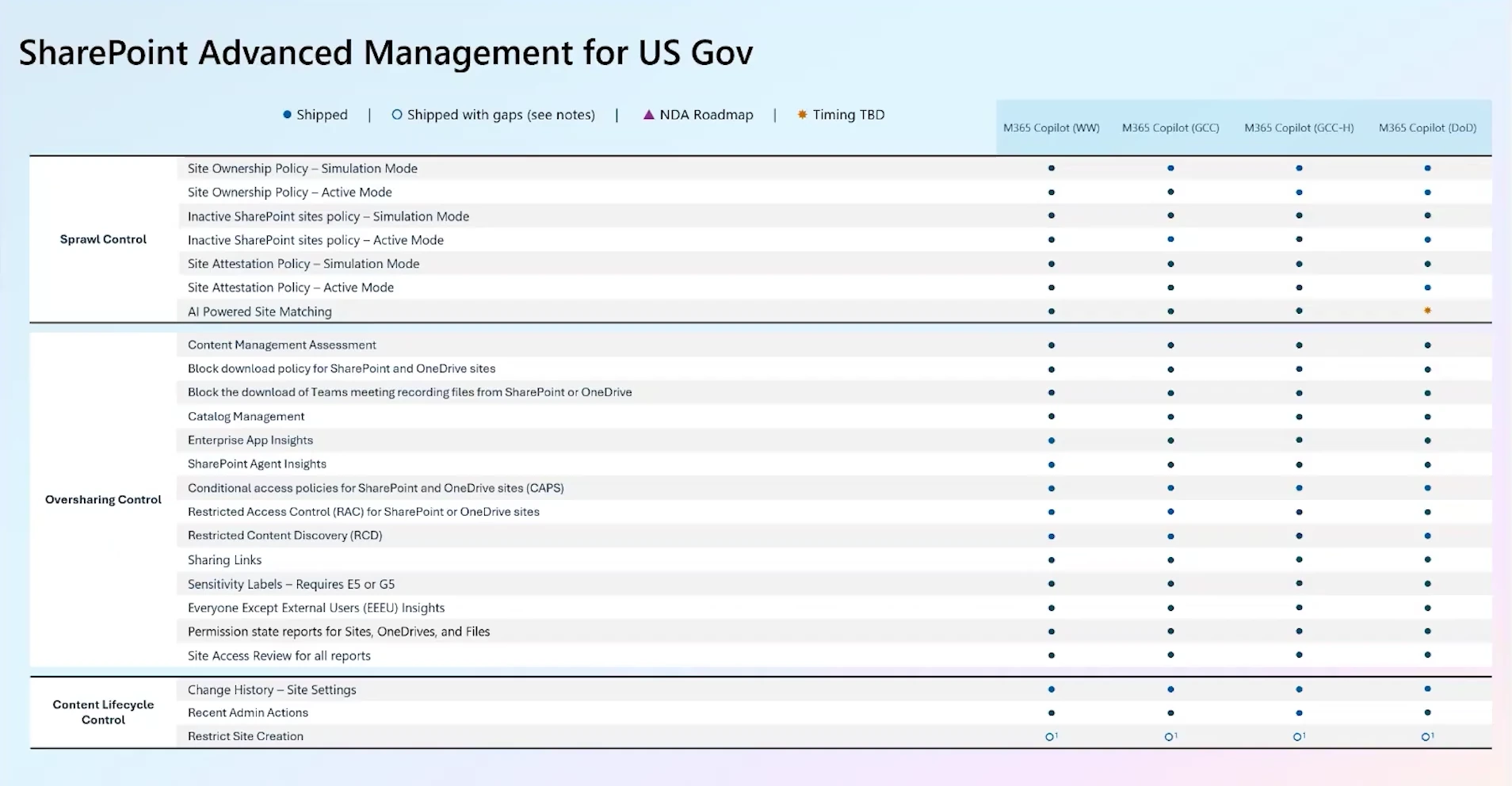
One piece of good news if you work in government: as of February, SharePoint Advanced Management is fully supported across sovereign clouds. The only capability still rolling out is AI-powered semantic site matching, with full parity targeted within a few months. That is a meaningful change from the years when government tenants waited well behind worldwide release.
Want to go deeper on administering Copilot and agents? Content governance is a substantial part of what Microsoft now expects Copilot administrators to know. My AB-900 Copilot and Agent Administration Fundamentals study guide walks through the full objective list, and you can find every guide on the Microsoft credential study guides page.
Frequently asked questions
Are the three original governance pillars being retired?
No. Sprawl control, oversharing control, and lifecycle management are unchanged, and the tooling behind them is still being actively developed. Content relevance and content resilience are additions to the model, not replacements for anything in it.
Do I need SharePoint Advanced Management to do content governance?
No, but you will do considerably less of it. Several pillars have baseline capabilities in SharePoint and Microsoft Purview without SAM. What SAM adds is tenant-wide reporting, policy automation, and the data that the SharePoint Admin Agent reasons over. If you own a Microsoft 365 Copilot license, you already have SAM, which I covered in my SharePoint Advanced Management licensing Q&A with Microsoft.
Is content relevance the same thing as data quality?
They overlap but are not identical. Data quality asks whether a document is accurate. Relevance asks whether it is the right document to surface for a given question, which depends on duplication, recency, and structure as much as on correctness. A perfectly accurate document that has three outdated near-copies is a relevance problem, not a quality one.
Where does Microsoft Purview fit across these pillars?
Purview handles classification, sensitivity labeling, retention, and eDiscovery, and it intersects most heavily with the oversharing and lifecycle pillars. The two toolsets are converging: sensitivity information from Purview is being surfaced inside SAM reporting so administrators can prioritize the riskiest content first.

