
Windows PowerShell updated your execution policy successfully, but the setting is overridden by a policy defined at a more specific scope
 By Vlad Catrinescu Microsoft MVP and MCT · Pluralsight Author
While working at a client on a Windows Server 2012R2 environment to create some PowerShell scripts, I had to change the Execution Policy, however running the “Set-ExecutionPolicy Unrestricted” command gave me the following error.
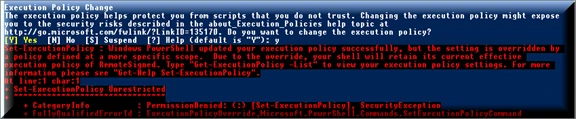
Set-ExecutionPolicy : Windows PowerShell updated your execution policy successfully, but the setting is overridden by a policy defined at a more specific scope. Due to the override, your shell will retain its current effective execution policy of RemoteSigned. Type “Get-ExecutionPolicy -List” to view your execution policy settings. For more information please see “Get-Help Set-ExecutionPolicy”.
The error can be quite confusing, what I did see first see what are the possible “more specific scopes” I can give to my command. By running the following command:
Get-ExecutionPolicy –ListI was able to see my available scopes.
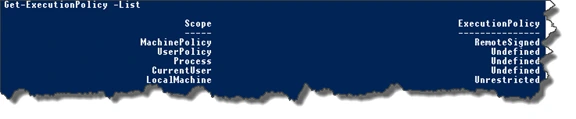
So now that I have them all, usually to run PowerShell scripts you need to work with the MachinePolicy. So, the command in order to change the MachinePolicy ExecutionPolicy is
Set-ExecutionPolicy -Scope MachinePolicy UnrestrictedHowever, you might have an error saying it can only be done via Group Policy.
“S_et-ExecutionPolicy : Cannot set execution policy. Execution policies at the MachinePolicy or UserPolicy scopes mustbe set through Group Policy._ “
If you get that error, read the resolution in my blog post: Change the PowerShell MachinePolicy Execution Policy in Windows Server 2012R2.

