
Step By Step Guide to configure the Managed Metadata Service Application for SharePoint 2013
 By Vlad Catrinescu Microsoft MVP and MCT · Pluralsight Author
As you have probably seen lately, I am releasing a lot of step by step guides to configure Service Applications in SharePoint 2013! The final objective is to have all Step By Step guides for every Service Application in SharePoint 2013 and have a fully featured farm!
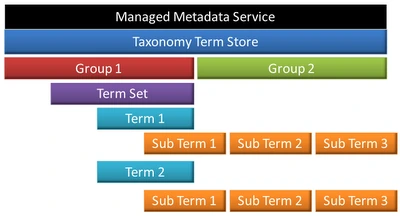
This guide is a step by step guide with Screenshots to create and configure a Managed Metadata Service Application in SharePoint 2013 as well as a Content Type Hub. It’s a really easy tutorial that should take maximum 30 minutes to complete!
I embedded the PDF with Scribd, however if you want to download it, there will be a link at the bottom of the post
[scribd id=117461472 key=key-9xwtjvet6t692h2cf6r mode=scroll]
Past Guides:
SharePoint 2013 Service Accounts Best Practices!
Step By Step Guide to configure the “Replicating directory changes” for SharePoint 2010 and 2013
Future Guides
Creating a User Profile Application & MySites
Configuring SharePoint Search Topology
Configure an environment for apps for SharePoint 2013
Configure Machine Translation Services SharePoint 2013
If you have any ideas for other Guides or need help with something, leave it in the comments! It might help more people than you think.

