Create Record Center Content Organizer rules using Powershell
 By Vlad Catrinescu Microsoft MVP and MCT · Pluralsight Author
Here is how to Create a Record Center Sub Site , and add a Content Organizer rule to it.
First, We need to Create the Subsite. The Template “OFFILE#1” is the Template for Record Center. You can find all Sharepoint Templates here (opens in a new tab).
$mainURL = “http://vlad.test.loc” (opens in a new tab)
$RecordCenterURL = “http://vlad.test.loc/RecordCenter“ (opens in a new tab)
$web = New-SPWeb $RecordCenterURL -Template “OFFILE#1” -AddToTopNav
Now, here is the chunk of code to Create the Content Organizer Rule.
Write-Host -ForegroundColor White ” – Creating the Supporting Documents Content Organizer Rule …” -NoNewline
[Microsoft.SharePoint.SPSite]$site = Get-SPSite $mainurl
[Microsoft.SharePoint.SPWeb]$web = Get-SPWeb $RecordCenterURL
[Microsoft.SharePoint.SPContentType]$ct = $site.RootWeb.ContentTypes[“Document”]
[Microsoft.Office.RecordsManagement.RecordsRepository.EcmDocumentRouterRule]$rule = New-Object Microsoft.Office.RecordsManagement.RecordsRepository.EcmDocumentRouterRule($web)
$rule.ConditionsString = ““
$rule.CustomRouter = “”
$rule.Name = “Supporting Documents Rule”
$rule.Description = “Routes ‘” + $ct.Name + “‘ documents to the records library”
$rule.ContentTypeString = $ct.Name
$rule.RouteToExternalLocation = $false
$rule.Priority = “5”
$rule.TargetPath = “/Records/Records”
$rule.Enabled = $true
$rule.Update()
Write-Host -ForegroundColor GREEN “Done.”
Write-Host
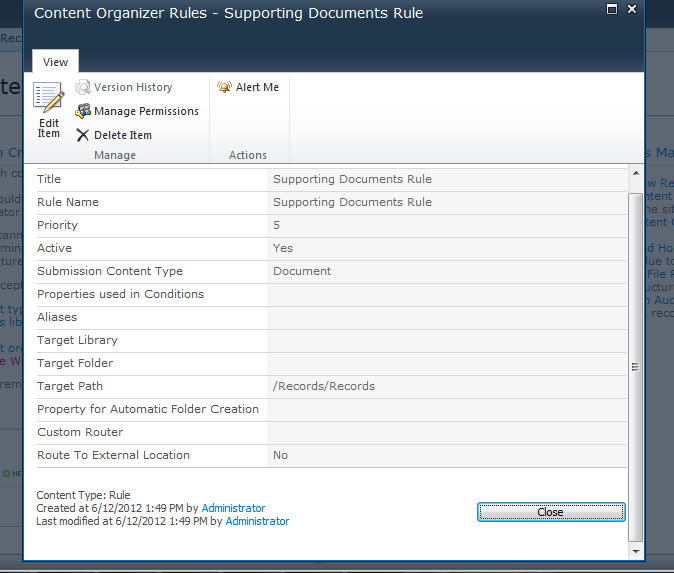
As you can see, this rule routes the Content Type “Document” to the /Records/Records Library.