
The Ultimate Script to download SharePoint Conference 2014 Videos AND slides!
 By Vlad Catrinescu Microsoft MVP and MCT · Pluralsight Author
After everyone posted about 10 script versions to download the SharePoint Conference 2014 videos I decided to add some extra value before releasing mine! This is what my script does:
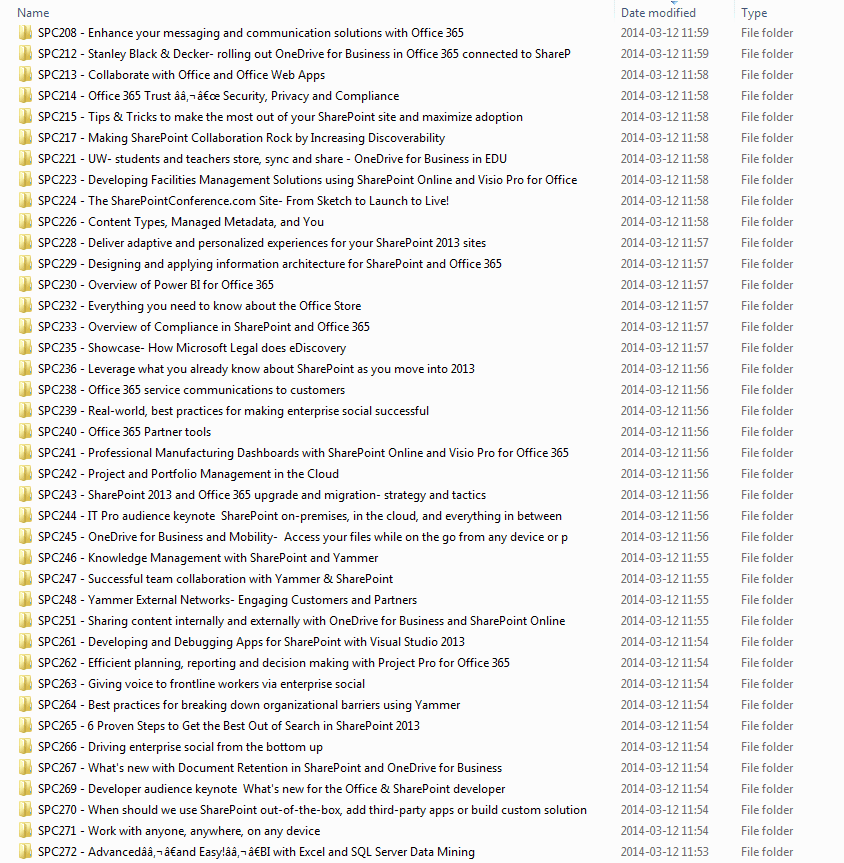
- Downloads all the SPC14 Sessions and Slides
- Groups them by folders
- Makes sure no errors come up due to Illegal File names.
- If you stop the script and restart in the middle, it will start where it left off and not from beginning.
The Total size will be a bit under 70GB.

At the end, it will look something like this:
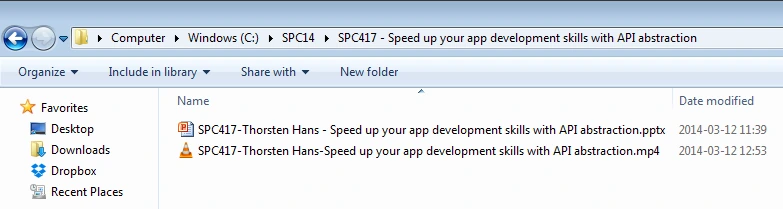
And inside every folder (provided slides have been added by Channel9) you will have both the .mp4 and the .pptx!
Here is a preview of the script, but DO NOT COPY PASTE IT FROM UNDER HERE, the WordPress plugin messed up some syntax. Instead OPEN IT HERE: http://gallery.technet.microsoft.com/PowerShell-Script-to-all-04e92a63 (opens in a new tab)
Make sure to share with your twitter followers:
UPDATE: 17 March 2014
– Added a TRIM on the file/folder name (Thanks Dan Holme!)
– Added the Download of the text file that contains the description of the session (Thanks VyperWare)
– Added Quotes to test if file already exists (Thanks Marat Bakirov)
Update1 (12 March): Also added (“) and (*) as illegal characters so they don’t break SPC3991! Thanks > @maxmelcher (opens in a new tab)
# Originally published at https://gist.github.com/nzthiago/5736907
# I Customized it for SPC14 with slides
# If you don't like it, complain to Github. :)
[Environment]::CurrentDirectory=(Get-Location -PSProvider FileSystem).ProviderPath
$rss = (new-object net.webclient)
# Grab the RSS feed for the MP4 downloads
# SharePoint Conference 2014 Videos
$a = ([xml]$rss.downloadstring("http://channel9.msdn.com/Events/SharePoint-Conference/2014/RSS/mp4high"))
$b = ([xml]$rss.downloadstring("http://channel9.msdn.com/Events/SharePoint-Conference/2014/RSS/slides"))
#other qualities for the videos only. Choose the one you want!
# $a = ([xml]$rss.downloadstring("http://channel9.msdn.com/Events/SharePoint-Conference/2014/RSS/mp4"))
#$a = ([xml]$rss.downloadstring("http://channel9.msdn.com/Events/SharePoint-Conference/2014/RSS/mp3"))
#Preferably enter something not too long to not have filename problems! cut and paste them afterwards
$downloadlocation = "C:\spc14"
if (-not (Test-Path $downloadlocation)) {
Write-Host "Folder $fpath dosen't exist. Creating it..."
New-Item $downloadlocation -type directory
}
set-location $downloadlocation
#Download all the slides
$b.rss.channel.item | foreach{
$code = $_.comments.split("/") | select -last 1
# Grab the URL for the PPTX file
$urlpptx = New-Object System.Uri($_.enclosure.url)
$filepptx = $code + "-" + $_.creator + " - " + $_.title.Replace(":", "-").Replace("?", "").Replace("/", "-").Replace("<", "").Replace("|", "").Replace('"',"").Replace("*","")
$filepptx = $filepptx.substring(0, [System.Math]::Min(120, $filepptx.Length))
$filepptx = $filepptx.trim()
$filepptx = $filepptx + ".pptx"
if ($code -ne "")
{
$folder = $code + " - " + $_.title.Replace(":", "-").Replace("?", "").Replace("/", "-").Replace("<", "").Replace("|", "").Replace('"',"").Replace("*","")
$folder = $folder.substring(0, [System.Math]::Min(100, $folder.Length))
$folder = $folder.trim()
}
else
{
$folder = "NoCodeSessions"
}
if (-not (Test-Path $folder)) {
Write-Host "Folder $folder dosen't exist. Creating it..."
New-Item $folder -type directory
}
#text description from session . Thank you VaperWare
$OutFile = New-Item -type file "$($downloadlocation)\$($Folder)\$($Code.trim()).txt" -Force
$Category = "" ; $Content = ""
$_.category | foreach {$Category += $_ + ","}
$Content = $_.title.trim() + "`r`n" + $_.creator + "`r`n" + $_.summary.trim() + "`r`n" + "`r`n" + $Category.Substring(0,$Category.Length -1)
add-content $OutFile $Content
# Make sure the PowerPoint file doesn't already exist
if (!(test-path "$downloadlocation\$folder\$filepptx"))
{
# Echo out the file that's being downloaded
$filepptx
$wc = (New-Object System.Net.WebClient)
# Download the MP4 file
$wc.DownloadFile($urlpptx, "$downloadlocation\$filepptx")
mv $filepptx $folder
}
}
#download all the mp4
# Walk through each item in the feed
$a.rss.channel.item | foreach{
$code = $_.comments.split("/") | select -last 1
# Grab the URL for the MP4 file
$url = New-Object System.Uri($_.enclosure.url)
# Create the local file name for the MP4 download
$file = $code + "-" + $_.creator + "-" + $_.title.Replace(":", "-").Replace("?", "").Replace("/", "-").Replace("<", "").Replace("|", "").Replace('"',"").Replace("*","")
$file = $file.substring(0, [System.Math]::Min(120, $file.Length))
$file = $file.trim()
$file = $file + ".mp4"
if ($code -ne "")
{
$folder = $code + " - " + $_.title.Replace(":", "-").Replace("?", "").Replace("/", "-").Replace("<", "").Replace("|", "").Replace('"',"").Replace("*","")
$folder = $folder.substring(0, [System.Math]::Min(100, $folder.Length))
$folder = $folder.trim()
}
else
{
$folder = "NoCodeSessions"
}
if (-not (Test-Path $folder)) {
Write-Host "Folder $folder) dosen't exist. Creating it..."
New-Item $folder -type directory
}
# Make sure the MP4 file doesn't already exist
if (!(test-path "$folder\$file"))
{
# Echo out the file that's being downloaded
$file
$wc = (New-Object System.Net.WebClient)
# Download the MP4 file
$wc.DownloadFile($url, "$downloadlocation\$file")
mv $file $folder
}
}
