
Free Step by Step SharePoint Server 2013 Lab Guides by Microsoft
 By Vlad Catrinescu Microsoft MVP and MCT · Pluralsight Author
This Post contains a bunch of Free Step by Step SharePoint Server 2013 Lab Guides that Microsoft gives for free on its Download Center. Usually I post them together with the other free resources that Microsoft offers, however this is a Test Lab Guide (TLG) only post, and the rest of the resources will come later in the month.
Microsoft Download Center
-
Test Lab Guide: Configure SharePoint Server 2013 in a three-tier farm (opens in a new tab)
-
Test Lab Guide: Configure intranet and team sites for SharePoint Server 2013 (opens in a new tab)
-
Test Lab Guide: Demonstrate permissions with SharePoint Server 2013 (opens in a new tab)
-
Test Lab Guide: Demonstrate profile synchronization for SharePoint Server 2013 (opens in a new tab)
-
Test Lab Guide: Demonstrate Social Features for SharePoint Server 2013 (opens in a new tab)
-
Test Lab Guide: Configure eDiscovery for SharePoint Server 2013 (opens in a new tab)
-
Test Lab Guide: Create a Business Intelligence Baseline Environment (opens in a new tab)
-
Test Lab Guide: Configure Excel Services (opens in a new tab)
-
Test Lab Guide: Configure the Excel Services unattended service account (opens in a new tab)
-
Test Lab Guide: Configure Visio Services (opens in a new tab)
-
Test Lab Guide: Configure the Visio Services unattended service account (opens in a new tab)
-
Test Lab Guide: Configure PerformancePoint Services (opens in a new tab)
-
Test Lab Guide: Configure data access for PerformancePoint Services (opens in a new tab)
-
Test Lab Guide Mini-Module: Configuring a Second SharePoint Server 2013 Farm (opens in a new tab)
-
Test Lab Guide: Configure an Integrated Exchange, Lync, and SharePoint Test Lab (opens in a new tab)
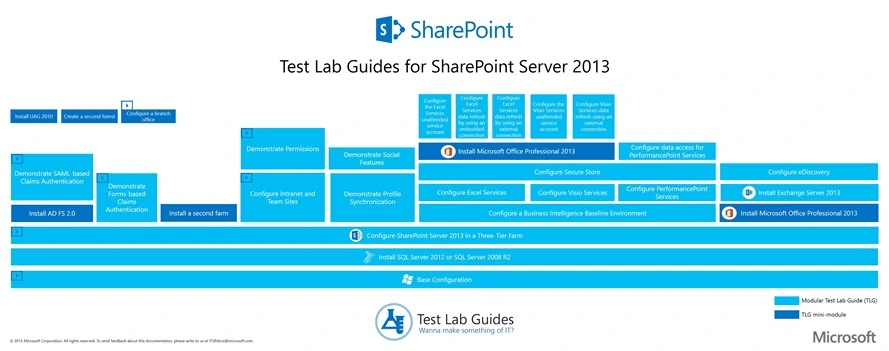
A very nice Poster from Microsoft that resumes the above http://www.microsoft.com/en-ca/download/details.aspx?id=39298 (opens in a new tab)
Teched North America
-
Configuring Office Web Applications for Microsoft SharePoint 2013 (opens in a new tab)
-
Configuring Social Features in Microsoft SharePoint 2013 (opens in a new tab)
-
Extending the Search Experience in Microsoft SharePoint 2013 (opens in a new tab)
-
Introduction to Web Content Management in Microsoft SharePoint 2013 (opens in a new tab)
-
Designing a Microsoft SharePoint 2013 Site (opens in a new tab)
Share this post with your followers on twitter by clicking this cool bird right under here

