
Unknown SQL Exception 297 occurred. Additional error information from SQL Server is included below.
 By Vlad Catrinescu Microsoft MVP and MCT · Pluralsight Author
I recently came across Unknown SQL Exception 297 in the Event Viewer in two of my SharePoint Deployments. One with SQL 2012 and one with SQL 2008 R2.
Here is the full error message.
Unknown SQL Exception 297 occurred. Additional error information from SQL Server is included below.``The user does not have permission to perform this action.
Event ID: 5586

Luckily, this error is pretty easy to repair. You have to grant the “View server state” permission to the farm account on the database. Here is How you do it on both servers
SQL Server 2008R2
1. Open SQL Management Studio and login to the instance where your SharePoint is installed.
2. Go in the Database Properties
3. Go to Permissions and Select your Farm Account.
4. Find the Permission “View Server state” and check the “grant” checbox

5. Click OK. If you want to make sure that the permissions applied, just go on the tab called “Effective” and you should see the permission at the end of the list.

SQL Server 2012
1. Open SQL Management Studio and login to the instance where your SharePoint is installed.
2. Open the Security Tab, Select your Farm account and click Properties.
3. Go in the Securables Section, Scrolldown and you will see the “VIEW Server State” , check “grant”
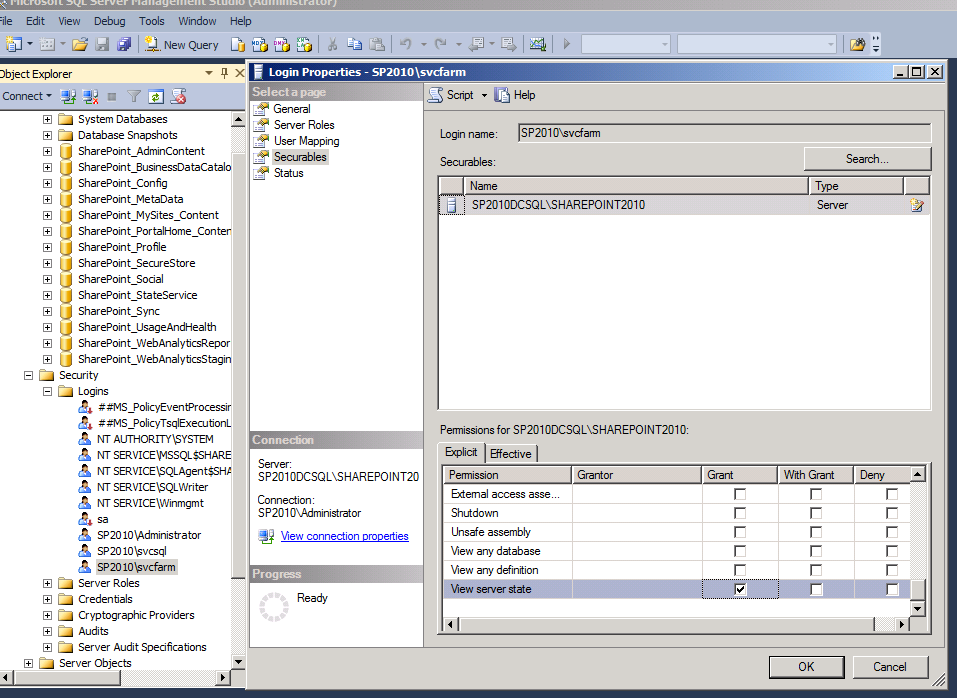
4. Click OK.
Uknown SQL Exception297 should stop appearing in your Event Viewer.
If this was helpful, say thanks in the comments :).

