
SharePoint Server 2016 encountered an error during setup
 By Vlad Catrinescu Microsoft MVP and MCT · Pluralsight Author
SharePoint Server 2016 Preview just came out, and a lot of you have probably already downloaded it, or plan to download it and test it to find out what is new. Sometimes when installing SharePoint 2016 I had this error randomly, and I Saw on twitter that I wasn’t the only one, so I decided to make a blog about it.
Basically, when installing SharePoint Server 2016 you get the “Microsoft SharePoint Server 2016 encountered an error during setup”, and when the error page opens you see its error 1603.
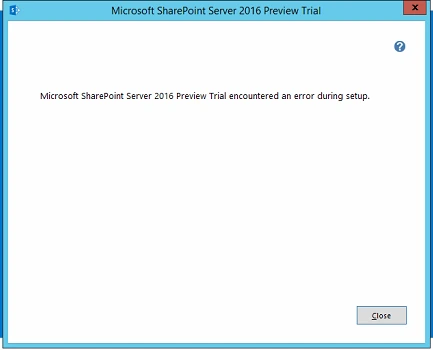
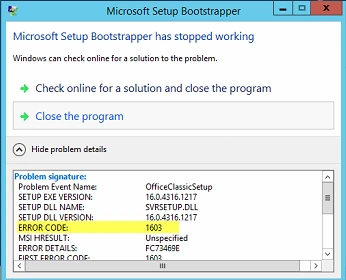
In my case, I only had to restart the installer and everything went fine, but in the past when the installer crashed, it used to be because the SharePoint VM only had one core. So, try to re-start the SharePoint setup, and if that doesn’t work, make sure your SharePoint VM has at least two cores.
If that doesn’t work, try this fix by Luis Valencia! Run this in PowerShell as an Administrator!
if(!(Test-Path HKLM:\SOFTWARE\Policies\Microsoft\Windows\Installer)){
New-Item -Path HKLM:\SOFTWARE\Policies\Microsoft\Windows\Installer | Out-Null
}
$regProps = Get-ItemProperty -Path HKLM:\SOFTWARE\Policies\Microsoft\Windows\Installer
if(! $regProps.logging){
New-ItemProperty -Path HKLM:\SOFTWARE\Policies\Microsoft\Windows\Installer -Name logging -Value voicewarmup -PropertyType String | Out-Null
}
if(! $regProps.debug){
New-ItemProperty -Path HKLM:\SOFTWARE\Policies\Microsoft\Windows\Installer -Name debug -Value 3 -PropertyType DWord | Out-Null
}
Let me know in the comments if you had this error!

