
The settings could not be saved because of an internal error: There was an internal problem connecting to or querying the database
 By Vlad Catrinescu Microsoft MVP and MCT · Pluralsight Author
Today I was at a client and we wanted to create a new Managed Property called “EntityName”. It looked simple, just create a new manage property, set your options, click OK and it’s done! However, we got this strange error:
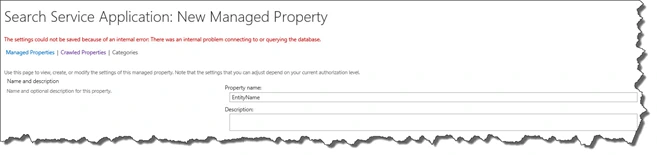
_“The settings could not be saved because of an internal error: There was an internal problem connecting to or querying the database.”
_
After reading the error message, my first reaction was checking if the SQL was up and I didn’t have any Access Denied errors in the Event Viewer. However, everything looked up. I then looked up in the ULS and found the following log:
SqlError: ‘Violation of PRIMARY KEY constraint ‘PK_MSSManagedProperties’. Cannot insert duplicate key in object ‘dbo.MSSManagedProperties’. The duplicate key value is (EntityName, 0).’ Source: ‘.Net SqlClient Data Provider’ Number: 2627 State: 1 Class: 14 Procedure: ‘proc_MSS_AddManagedPropertyEx’ LineNumber: 52 Server: SQLSERVER,1433′
SqlError: ‘The statement has been terminated.’ Source: ‘.Net SqlClient Data Provider’ Number: 3621 State: 0 Class: 0 Procedure: ‘proc_MSS_AddManagedPropertyEx’ LineNumber: 52 Server: SQLSERVER,1433′
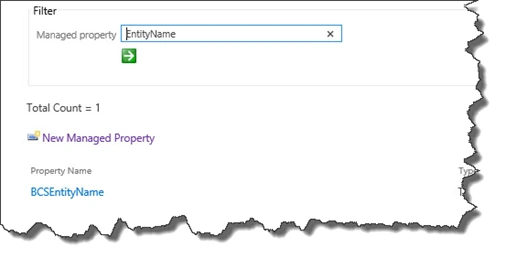
According to the log, there is already a managed property called “EntityName” in Managed properties, however when I do a Search for it, it doesn’t show up!
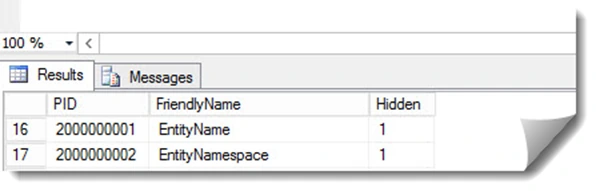
I wanted to know more on the problem, so I went to SQL Database (PS: Microsoft doesn’t recommend you to do this!) and looked what’s inside the ‘dbo.MSSManagedProperties’ table. I then found something really interesting, there is a field called “Hidden”! And no surprise, my “EntityName” was in there:
So, to help you in the future, here are all the hidden Managed Properties in SharePoint 2013:
So, to fix this problem, make sure you name your new Managed Property something that is not in the columns above!

