
Blank PowerPivot Gallery after migration to SharePoint 2013
 By Vlad Catrinescu Microsoft MVP and MCT · Pluralsight Author
After migrating a Site Collection that had a PowerPivot Gallery on it from SharePoint 2010 to SharePoint 2013, I had users complaining that the PowerPivot Gallery was blank and not showing anything. My first reaction when starting to debug was “This still runs on Silverlight?” … and yes it does still run on Silverlight. The code inside the html file looks something like this:

Everything seemed ok and it worked in SharePoint 2010, then I realized that Microsoft renamed the “XAP” addin between SharePoint 2010 & SharePoint 2013. As you can see in the following screenshot, in SharePoint 2013 (top) it’s called “Microsoft.AnalysisServices.SPAddin.ReportGallery.xap” while in SharePoint 2010 it was called “Microsoft.AnalysisServices.ReportGallery.xap”.
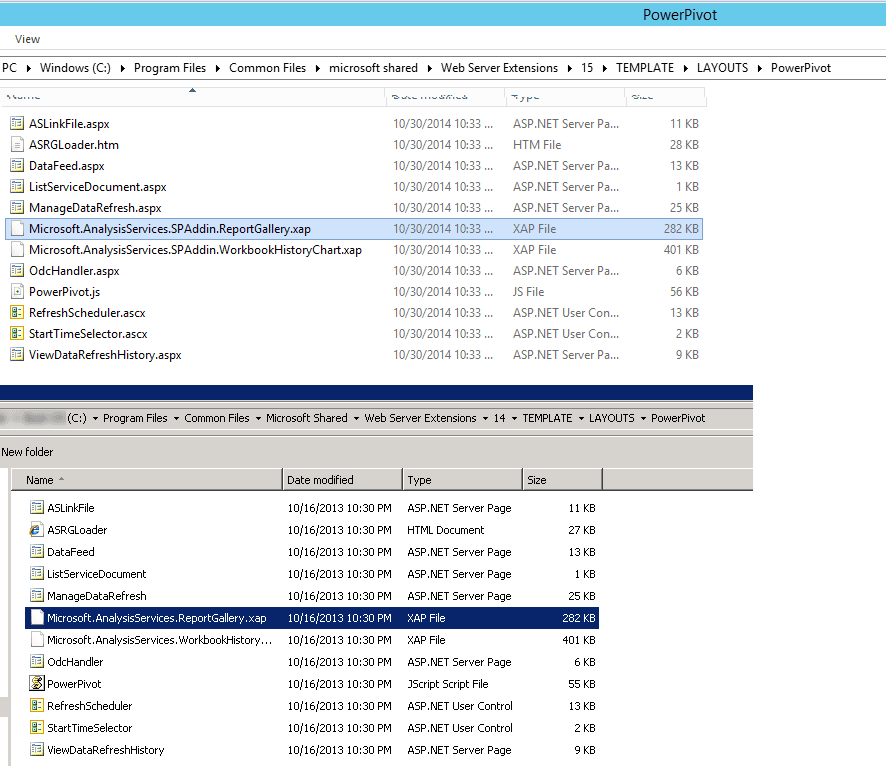
Because the XAP file name is hard coded into the Silverlight file for the PowerPivot Gallery, SharePoint does not find it and therefore shows a blank gallery. To fix it, simply change the name in the HTML file for your gallery. It should look something like this in the end.

Afterwards, you save it and your Gallery should work again!
Drop a comment if this helped!

